External REST API
Read and write the same products, accounts, insights, signals, opportunities, ideas, OKRs, context units, and context documents you manage in the app over HTTPS with workspace API keys. Vendor connections (Zoom, Jira, Google Drive, and others) are covered in the integration guides; this reference is for HTTP paths, methods, and payloads.
Secure
Keys and scopes are managed in workspace Settings; revoke anytime.
Fast
JSON over HTTPS for automation and dashboards.
RESTful
Conventional resources and verbs so clients stay predictable.
Authentication
All API requests must include an Authorization header with your API key as a bearer token. You can manage your API keys in the Settings > API Keys section of your Zentrik workspace.
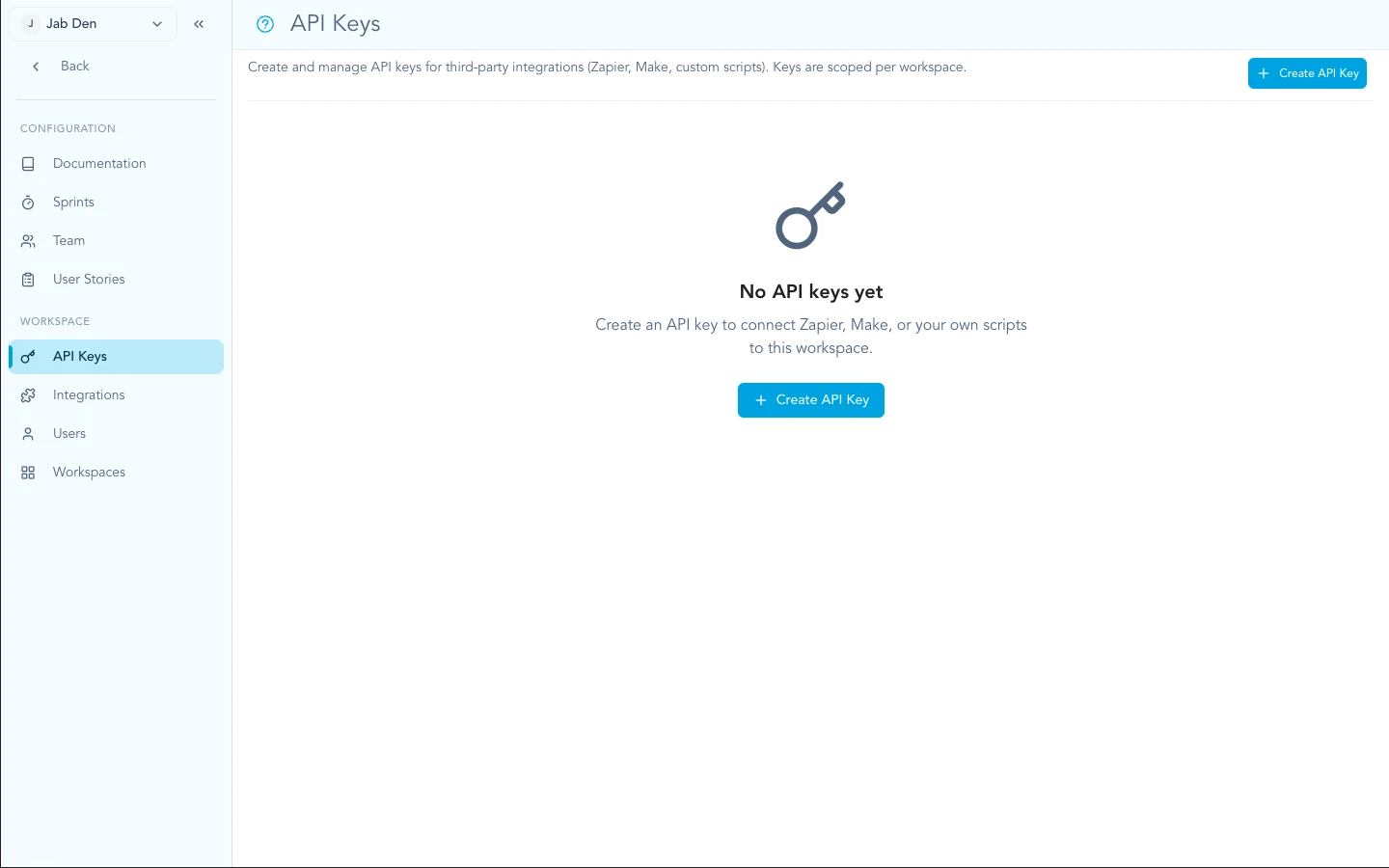
Create and manage keys from Settings → API keys in your workspace.
curl -H "Authorization: Bearer YOUR_API_KEY" \
  https://zentrik.ai/api/external/v1/insights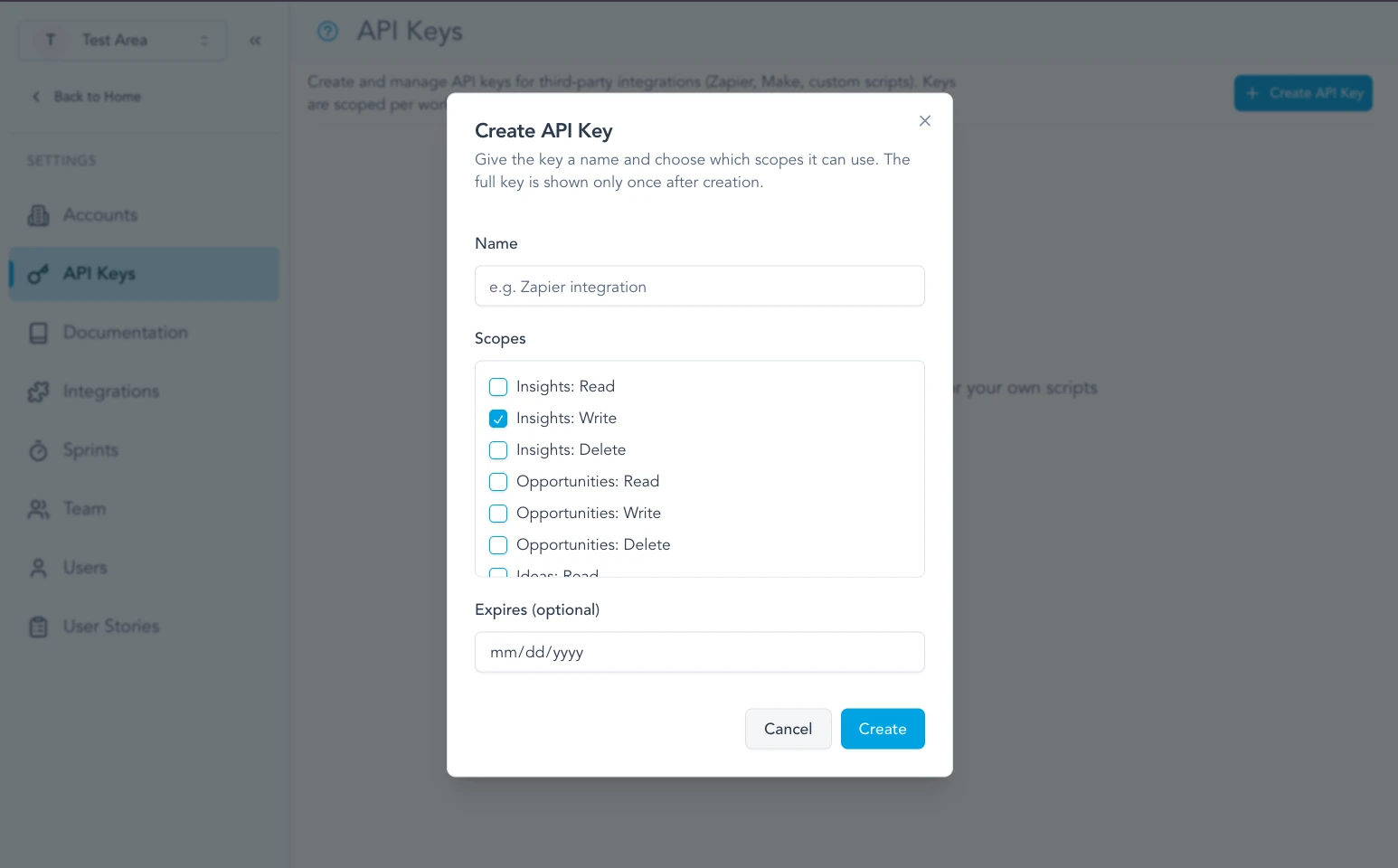
Each key can be limited to the API scopes your automation needs.
Keep your API keys secret. Do not share them or commit them to public repositories. If a key is compromised, revoke it immediately in the dashboard.
Signals
Signals are the imported transcripts, tickets, reviews, and reports that feed Discovery. Use these endpoints when you want to bring evidence into Zentrik from another source.
/external/v1/signals/external/v1/signals/:publicId/external/v1/signals/external/v1/signals/:publicId/external/v1/signals/:publicId/external/v1/signals/:publicId/processList signals
List a bounded page of signals in your workspace. Signals are imported pieces of customer or market evidence such as transcripts, support tickets, reviews, and discovery reports.
Requirements
Request
Parameters
| Name | Type | Description |
|---|---|---|
| limit | number | Maximum number of items to return (default: 20, maximum: 100) |
| offset | number | Number of items to skip (default: 0) |
Responses
Signals were successfully retrieved. Pagination metadata is returned in X-Total-Count, X-Limit, X-Offset, and X-Has-More headers.
Example Request
/external/v1/signalscurl -X GET https://zentrik.ai/api/external/v1/signals?limit=10 \
-H 'Authorization: Bearer YOUR_API_KEY'Example Response
[
  {
    "id": "uuid",
    "name": "Support Ticket - 3/20/24, 10:00 AM",
    "publicId": "SIGNAL-42",
    "workspaceId": "workspace-uuid",
    "status": "processed",
    "context": "support_request",
    "signalType": null,
    "processorType": "zendesk",
    "providerType": "zendesk",
    "evidenceKind": "support_ticket",
    "analysisProfile": "support_ticket",
    "provenance": {
      "providerType": "zendesk",
      "evidenceKind": "support_ticket",
      "analysisProfile": "support_ticket"
    },
    "sourceFacet": "zendesk:support_ticket",
    "sourceLabel": "Zendesk support ticket",
    "sourceLinks": [
      {
        "name": "Open Zendesk ticket",
        "url": "https://example.zendesk.com/agent/tickets/12345",
        "type": "support_ticket",
        "primary": true
      }
    ],
    "source": {
      "type": "zendesk",
      "external_data": {
        "ticketId": "12345"
      }
    },
    "data": {
      "subject": "Users cannot reset password",
      "severity": "high"
    },
    "insightIds": [],
    "accountIds": [],
    "accountId": null,
    "accountExternalId": null,
    "externalId": "external-123",
    "createdAt": "2024-03-20T10:00:00Z",
    "updatedAt": "2024-03-20T10:00:00Z"
  }
]Get one signal
Retrieve a single signal by its public ID.
Requirements
Request
Parameters
| Name | Type | Description |
|---|---|---|
| publicId * | string | Workspace-scoped public ID, such as SIGNAL-42 |
Responses
The signal was successfully retrieved.
No signal found with the provided ID.
Example Request
/external/v1/signals/:publicIdcurl -X GET https://zentrik.ai/api/external/v1/signals/SIGNAL-42 \
-H 'Authorization: Bearer YOUR_API_KEY'Example Response
{
  "id": "uuid",
  "name": "Support Ticket - 3/20/24, 10:00 AM",
  "publicId": "SIGNAL-42",
  "workspaceId": "workspace-uuid",
  "status": "processed",
  "context": "support_request",
  "signalType": null,
  "processorType": "zendesk",
  "providerType": "zendesk",
  "evidenceKind": "support_ticket",
  "analysisProfile": "support_ticket",
  "provenance": {
    "providerType": "zendesk",
    "evidenceKind": "support_ticket",
    "analysisProfile": "support_ticket"
  },
  "sourceFacet": "zendesk:support_ticket",
  "sourceLabel": "Zendesk support ticket",
  "sourceLinks": [
    {
      "name": "Open Zendesk ticket",
      "url": "https://example.zendesk.com/agent/tickets/12345",
      "type": "support_ticket",
      "primary": true
    }
  ],
  "source": {
    "type": "zendesk",
    "external_data": {
      "ticketId": "12345"
    }
  },
  "data": {
    "sessionId": "session-123"
  },
  "insightIds": [
    "insight-uuid"
  ],
  "accountIds": [],
  "accountId": null,
  "accountExternalId": null,
  "externalId": "external-123",
  "createdAt": "2024-03-20T10:00:00Z",
  "updatedAt": "2024-03-20T10:00:00Z"
}Create a signal
Create a new signal by sending the text you want Zentrik to analyze. This is the recommended public API flow for transcripts, support tickets, reviews, structured feedback records, and discovery reports. Advanced raw signal bodies are also accepted on this same endpoint and are auto-queued.
Requirements
Request
Request body (application/json)
Optional display name for the signal. When omitted for typed text signals, Zentrik generates one from the signal type and timestamp.
The raw transcript, support ticket, review, structured feedback record, or discovery report text that Zentrik should process into insights.
What kind of text you are sending. This determines how Zentrik processes the signal. New text signals are automatically queued for processing after creation.
Optional source system or importer identifier, such as g2, app_store, reddit, gartner, manual_csv, or external_api.
Optional evidence shape override. For typed text this defaults from signalType and usually does not need to be sent.
Optional processing profile override. For typed text this defaults from signalType.
Optional notes to help Zentrik interpret the text correctly. Use this for things like where the text came from, what batch it belongs to, or any lightweight analyst note. This is treated as supplemental context, not an instruction override.
Optional timestamp representing when the original signal happened. When provided, it is used as the signal creation timestamp for trend accuracy.
Optional list of products to narrow the product context used during processing.
Optional account to associate with this signal and the insights created from typed text processing.
Optional list of account IDs to associate directly with this signal. Use accountId for the common single-account case.
Optional stable client-side account identifier, such as crm-example-account. Prefer this for CRM automations that should not persist backend UUIDs.
Stable record identifier from the source system. Use this for recurring imports so retries can deduplicate and reconcile back to the original record.
Links users should land on from Zentrik, such as the original app store review, G2 review, Reddit thread or comment, Gartner report, support ticket, source row, or meeting link. HTTP and HTTPS URLs are normalized and returned on the Signal object.
Provider-specific metadata to keep with the signal, such as reviewId, rating, locale, reportId, threadId, productSlug, or dataset. Zentrik stores this under source.external_data.
Responses
The signal was successfully created and queued for asynchronous processing. Create responses include a queued job id.
Example Request
/external/v1/signals{
"name": "G2 Reviews - March Batch",
"text": "Users love the product overall, but several reviewers mention that exports are hard to find and slow to complete for large datasets.",
"signalType": "review",
"providerType": "g2",
"externalId": "g2-review:review-row-1",
"additionalContext": "Public review batch collected from G2 and Capterra.",
"occurredAt": "2025-03-11T14:30:00Z",
"productIds": [
"product-uuid-1"
],
"accountExternalId": "crm-example-account",
"sourceExternalData": {
"reviewId": "review-row-1",
"rating": 3,
"productSlug": "example-product"
},
"sourceLinks": [
{
"name": "Open G2 review",
"url": "https://www.g2.com/products/example-product/reviews/review-row-1",
"type": "review",
"primary": true
}
]
}Example Response
{
  "id": "uuid",
  "name": "Review - 3/11/25, 2:30 PM",
  "publicId": "SIGNAL-43",
  "workspaceId": "workspace-uuid",
  "status": "processing",
  "context": null,
  "signalType": "review",
  "processorType": "manual-text",
  "providerType": "g2",
  "evidenceKind": "review",
  "analysisProfile": "survey_response",
  "provenance": {
    "providerType": "g2",
    "evidenceKind": "review",
    "analysisProfile": "survey_response"
  },
  "sourceFacet": "g2:review",
  "sourceLabel": "G2 Review",
  "sourceLinks": [
    {
      "name": "Open G2 review",
      "url": "https://www.g2.com/products/example-product/reviews/review-row-1",
      "type": "review",
      "primary": true
    }
  ],
  "source": {
    "type": "manual-text",
    "external_data": {
      "reviewId": "review-row-1",
      "rating": 3,
      "productSlug": "example-product",
      "links": [
        {
          "name": "Open G2 review",
          "url": "https://www.g2.com/products/example-product/reviews/review-row-1",
          "type": "review",
          "primary": true
        }
      ]
    }
  },
  "data": {
    "s3Key": "signals/manual-text/workspace-uuid/uuid.txt",
    "productIds": [
      "product-uuid-1"
    ],
    "accountId": "account-uuid-1",
    "accountExternalId": "crm-example-account",
    "additionalContext": "Public review batch collected from G2 and Capterra.",
    "uploadedAt": "2025-03-21T10:00:00Z"
  },
  "insightIds": [],
  "accountId": "account-uuid-1",
  "accountExternalId": "crm-example-account",
  "externalId": "g2-review:review-row-1",
  "createdAt": "2025-03-11T14:30:00Z",
  "updatedAt": "2025-03-21T10:00:00Z",
  "jobId": "job-123",
  "processing": {
    "lastJobId": "job-123",
    "startedAt": "2025-03-21T10:00:00Z",
    "processedAt": null,
    "failedAt": null,
    "lastError": null
  }
}Update a signal
Update fields of an existing signal, such as metadata or linked insights.
Requirements
Request
Parameters
| Name | Type | Description |
|---|---|---|
| publicId * | string | Workspace-scoped public ID, such as SIGNAL-43 |
Request body (application/json)
Updated source descriptor for the signal.
Updated arbitrary context payload.
Replace the list of linked insight IDs.
Updated external record identifier.
Processing status for the signal.
Persisted signal context, such as user_interview or support_request.
Responses
The signal was successfully updated.
Example Request
/external/v1/signals/:publicIdcurl -X PATCH https://zentrik.ai/api/external/v1/signals/SIGNAL-43 \
-H 'Authorization: Bearer YOUR_API_KEY' \
-H 'Content-Type: application/json' \
-d '{"insightIds": ["insight-uuid"]}'Delete a signal
Permanently delete a signal from the workspace.
Requirements
Request
Parameters
| Name | Type | Description |
|---|---|---|
| publicId * | string | Workspace-scoped public ID, such as SIGNAL-43 |
Responses
The signal was successfully deleted.
Example Request
/external/v1/signals/:publicIdcurl -X DELETE https://zentrik.ai/api/external/v1/signals/SIGNAL-43 \
-H 'Authorization: Bearer YOUR_API_KEY'Example Response
{
  "message": "Deleted"
}Process a signal
Queue signal processing for an existing signal. Use this for explicit re-runs or manual retries.
Requirements
Request
Parameters
| Name | Type | Description |
|---|---|---|
| publicId * | string | Workspace-scoped public ID, such as SIGNAL-43. |
Responses
The signal was queued for asynchronous processing.
Example Request
/external/v1/signals/:publicId/processcurl -X POST https://zentrik.ai/api/external/v1/signals/SIGNAL-43/process \
-H 'Authorization: Bearer YOUR_API_KEY'Example Response
{
  "jobId": "job-456"
}
Creation Modes
The recommended public API flow is typed text ingestion. Sendtext andsignalTypeto create a manual signal that is automatically queued for AI processing into insights.
Supported signal types: transcript, support_ticket, review, feedback_record, discovery_report
Canonical provenance: processorType controls routing, providerType identifies the source system, evidenceKind describes the evidence shape, and analysisProfile selects the extraction behavior.
Source links: send sourceLinks with final URLs for the original review, thread, report, ticket, source row, or meeting so Zentrik can render direct evidence actions in Discovery.
Profile mapping: transcript → transcript analysis, support_ticket → ticket analysis, review and feedback_record → feedback/review analysis, discovery_report → synthesized discovery-report analysis
Async behavior: create returns a processing signal plus a jobId
Inferred context: you do not need to send a context label. Zentrik infers the best matching interaction context during processing.
Advanced/raw ingestion: the same create endpoint also supports lower-level fields such as processorType, providerType, evidenceKind, source, and data.
Those fields are intentionally omitted from the primary docs here because most public API users only need the typed text flow.
Data Models
Signals are intentionally flexible. The core fields help you track provenance while thesource anddata payloads carry your custom structure.
Signal Object
| Field | Type | Description |
|---|---|---|
| id | uuid | The unique identifier for the signal. |
| name | string | Display name for the signal. For typed text signals, Zentrik can generate this automatically from the signal type and timestamp. |
| publicId | string | Workspace-scoped, human-readable identifier in the form "SIGNAL-123". Useful for referencing signals in UI and exports. |
| workspaceId | uuid | ID of the workspace this signal belongs to. |
| status | 'pending' | 'processing' | 'processed' | 'failed' | Processing status of the signal. Create responses that queue work now typically return processing immediately, then later settle to processed or failed. |
| signalType | 'transcript' | 'support_ticket' | 'review' | 'feedback_record' | 'discovery_report' | null | Present for manual text signals. Indicates which typed ingestion flow created the signal. |
| processorType | string | Canonical operational processor route, such as manual-text, manual-transcript, gong, or zendesk. |
| providerType | string | Canonical source system or importer, such as external_api, manual, gong, zendesk, gmail_mailbox, or g2. |
| evidenceKind | string | Canonical evidence shape, such as transcript, support_ticket, review, feedback_record, discovery_report, or email_thread. |
| analysisProfile | 'default_transcript' | 'support_ticket' | 'survey_response' | 'discovery_report' | Canonical prompt/extraction profile used by processing. |
| provenance | { providerType: string; evidenceKind: string; analysisProfile: string } | Canonical signal provenance grouped for clients that do not need operational processor routing. |
| sourceFacet | string | Derived filter/grouping key in the form providerType:evidenceKind. |
| sourceLabel | string | Derived display label for the source facet. |
| sourceLinks | { name: string; url: string; type: string; primary?: boolean }[] | Normalized source links users can open from Discovery to inspect the original evidence. These are derived from sourceLinks on create and legacy URL fields stored in source.external_data, data, or import metadata. |
| context | string | null | Normalized interaction context inferred or stored for the signal, such as user_interview, feature_feedback, or support_request. Most clients do not need to send this on create. |
| source | { type: string; external_data?: object } | Provider-specific source payload. Canonical provenance lives in processorType, providerType, evidenceKind, and analysisProfile. |
| data | object | null | Stored metadata for the signal. For typed text signals this includes the S3 key plus optional product, account, and notes metadata. Most clients do not need to write this directly. |
| insightIds | uuid[] | List of insight IDs that have been linked to this signal. |
| accountIds | uuid[] | List of account IDs linked directly to this signal. |
| accountId | uuid | null | Legacy single-account field. When multiple accounts are linked, this returns the first linked account ID. |
| accountExternalId | string | null | Client-provided external account identifier when the signal was created with accountExternalId. |
| externalId | string | null | Identifier of the record in the external system (for example, a ticket or event identifier). |
| createdAt | iso-date | Timestamp when the signal was first created. |
| updatedAt | iso-date | Timestamp of the last modification. |
| jobId | string | undefined | Returned on create/process responses when an asynchronous processing job has been queued. |
| processing | { lastJobId?: string | null; startedAt?: string | null; processedAt?: string | null; failedAt?: string | null; lastError?: string | null } | null | Operational processing metadata. Use this to debug queue progress and retries before assuming a signal is stuck. |
Accounts
Manage workspace accounts over the External API so CRM automations can look up, create, and update the company records that signals and insights should attach to.
/external/v1/accounts/external/v1/accounts/:id/external/v1/accounts/external/v1/accounts/:id/external/v1/accounts/:id/external/v1/accounts/:id/contacts/external/v1/accounts/:id/contacts/external/v1/accounts/:id/contacts/:contactId/external/v1/accounts/:id/contacts/:contactIdList all accounts
List accounts in the current workspace. This is the main lookup endpoint for CRM automation before transcript ingestion.
Requirements
Request
Parameters
| Name | Type | Description |
|---|---|---|
| limit | number | Maximum number of accounts to return. |
| offset | number | Number of accounts to skip. |
| q | string | Case-insensitive search across name, domain, website, and externalId. |
| name | string | Exact account name match (case-insensitive). |
| domain | string | Exact domain or website match (case-insensitive). |
| externalId | string | Stable client-side identifier such as crm-example-account. |
Responses
Accounts were successfully retrieved.
Example Request
/external/v1/accountscurl -X GET 'https://zentrik.ai/api/external/v1/accounts?externalId=crm-example-account' \
-H 'Authorization: Bearer YOUR_API_KEY'Example Response
[
  {
    "id": "account-uuid",
    "name": "Example Account",
    "domain": "example.com",
    "website": "https://example.com",
    "lifecycleStage": "TRIAL",
    "externalId": "crm-example-account",
    "workspaceId": "workspace-uuid",
    "contactIds": [
      "contact-1"
    ],
    "insightIds": [
      "insight-1"
    ],
    "opportunityIds": [
      "opportunity-1"
    ],
    "ideaIds": [
      "idea-1"
    ],
    "createdAt": "2026-04-09T10:00:00Z",
    "updatedAt": "2026-04-09T10:00:00Z"
  }
]Get one account
Retrieve one account from the current workspace.
Requirements
Request
Parameters
| Name | Type | Description |
|---|---|---|
| id * | uuid | The backend account UUID. |
Responses
The account was successfully retrieved.
No account found with the provided id.
Example Request
/external/v1/accounts/:idcurl -X GET https://zentrik.ai/api/external/v1/accounts/account-uuid \
-H 'Authorization: Bearer YOUR_API_KEY'Example Response
{
  "id": "account-uuid",
  "name": "Example Account",
  "domain": "example.com",
  "website": "https://example.com",
  "lifecycleStage": "TRIAL",
  "externalId": "crm-example-account",
  "workspaceId": "workspace-uuid",
  "contactIds": [
    "contact-1"
  ],
  "insightIds": [
    "insight-1"
  ],
  "opportunityIds": [
    "opportunity-1"
  ],
  "ideaIds": [
    "idea-1"
  ],
  "createdAt": "2026-04-09T10:00:00Z",
  "updatedAt": "2026-04-09T10:00:00Z"
}Create an account
Create an account in the current workspace. CRM agents typically use `externalId` as the durable bridge between local records and Zentrik accounts. Manage contacts with the account contacts endpoints after the account exists.
Requirements
Request
Request body (application/json)
Account display name.
Stable client-side identifier such as crm-example-account.
Primary company domain.
Canonical website URL.
Industry or vertical label.
Company size bucket.
Canonical Zentrik lifecycle stage: LEAD, TRIAL, ACTIVE, CHURNED, or PARTNER.
Supplemental operator or CRM notes.
Responses
The account was successfully created.
Example Request
/external/v1/accounts{
"name": "Example Account",
"externalId": "crm-example-account",
"domain": "example.com",
"website": "https://example.com",
"industry": "B2B software",
"companySize": "11-50",
"lifecycleStage": "TRIAL",
"notes": "Primary contact evaluates roadmap fit."
}Example Response
{
  "id": "account-uuid",
  "name": "Example Account",
  "externalId": "crm-example-account",
  "domain": "example.com",
  "website": "https://example.com",
  "industry": "B2B software",
  "companySize": "11-50",
  "lifecycleStage": "TRIAL",
  "workspaceId": "workspace-uuid",
  "contactIds": [],
  "insightIds": [],
  "opportunityIds": [],
  "ideaIds": [],
  "createdAt": "2026-04-09T10:00:00Z",
  "updatedAt": "2026-04-09T10:00:00Z"
}Update an account
Update an existing account in the current workspace. Contact arrays are not accepted here; use the dedicated contact endpoints for people and roles.
Requirements
Request
Parameters
| Name | Type | Description |
|---|---|---|
| id * | uuid | The backend account UUID. |
Request body (application/json)
Updated display name.
Updated stable client-side identifier.
Updated primary company domain.
Updated canonical website URL.
Updated industry or vertical label.
Updated company size bucket.
Updated canonical Zentrik lifecycle stage.
Updated operator or CRM notes.
Responses
The account was successfully updated.
Example Request
/external/v1/accounts/:idcurl -X PATCH https://zentrik.ai/api/external/v1/accounts/account-uuid \
-H 'Authorization: Bearer YOUR_API_KEY' \
-H 'Content-Type: application/json' \
-d '{"lifecycleStage":"ACTIVE"}'Delete an account
Delete an account from the current workspace.
Requirements
Request
Parameters
| Name | Type | Description |
|---|---|---|
| id * | uuid | The backend account UUID. |
Responses
The account was successfully deleted.
Example Request
/external/v1/accounts/:idcurl -X DELETE https://zentrik.ai/api/external/v1/accounts/account-uuid \
-H 'Authorization: Bearer YOUR_API_KEY'List account contacts
List contacts linked to an account in the current workspace. Use this before contact sync automation rather than relying on account `contactIds` alone.
Requirements
Request
Parameters
| Name | Type | Description |
|---|---|---|
| id * | uuid | The backend account UUID. |
Responses
Contacts were successfully retrieved.
No account found with the provided id in the current workspace.
Example Request
/external/v1/accounts/:id/contactscurl -X GET https://zentrik.ai/api/external/v1/accounts/account-uuid/contacts \
-H 'Authorization: Bearer YOUR_API_KEY'Example Response
[
  {
    "id": "contact-uuid",
    "accountId": "account-uuid",
    "name": "Primary product contact",
    "role": "VP Product",
    "email": "product-contact@example.com",
    "phone": null,
    "notes": "Primary product evaluator and champion.",
    "isPrimary": true,
    "createdAt": "2026-04-09T10:00:00Z",
    "updatedAt": "2026-04-09T10:00:00Z"
  }
]Create an account contact
Create one contact on an account. This is the preferred way to add contacts; do not patch the account `contacts` array for incremental updates.
Requirements
Request
Parameters
| Name | Type | Description |
|---|---|---|
| id * | uuid | The backend account UUID. |
Request body (application/json)
Contact display name.
Role, title, or account-specific responsibility.
Email address.
Phone number.
Operator notes such as influence, interests, and outreach guidance.
Whether this is the primary contact for the account.
Responses
The contact was successfully created.
No account found with the provided id in the current workspace.
Example Request
/external/v1/accounts/:id/contacts{
"name": "Primary product contact",
"role": "VP Product",
"email": "product-contact@example.com",
"notes": "Primary product evaluator and champion.",
"isPrimary": true
}Example Response
{
  "id": "contact-uuid",
  "accountId": "account-uuid",
  "name": "Primary product contact",
  "role": "VP Product",
  "email": "product-contact@example.com",
  "notes": "Primary product evaluator and champion.",
  "isPrimary": true,
  "createdAt": "2026-04-09T10:00:00Z",
  "updatedAt": "2026-04-09T10:00:00Z"
}Update an account contact
Update one contact on an account. The contact must belong to the requested account in the current workspace.
Requirements
Request
Parameters
| Name | Type | Description |
|---|---|---|
| id * | uuid | The backend account UUID. |
| contactId * | uuid | The backend contact UUID. |
Request body (application/json)
Updated contact display name.
Updated role, title, or account-specific responsibility.
Updated email address.
Updated phone number.
Updated operator notes.
Updated primary-contact flag.
Responses
The contact was successfully updated.
No account/contact pair found in the current workspace.
Example Request
/external/v1/accounts/:id/contacts/:contactIdcurl -X PATCH https://zentrik.ai/api/external/v1/accounts/account-uuid/contacts/contact-uuid \
-H 'Authorization: Bearer YOUR_API_KEY' \
-H 'Content-Type: application/json' \
-d '{"notes":"Strategic evaluator. Reach out for roadmap and pricing context."}'Delete an account contact
Delete one contact from an account. This requires `accounts:write` so clients can manage contacts without receiving account-delete permission.
Requirements
Request
Parameters
| Name | Type | Description |
|---|---|---|
| id * | uuid | The backend account UUID. |
| contactId * | uuid | The backend contact UUID. |
Responses
The contact was successfully deleted.
No account/contact pair found in the current workspace.
Example Request
/external/v1/accounts/:id/contacts/:contactIdcurl -X DELETE https://zentrik.ai/api/external/v1/accounts/account-uuid/contacts/contact-uuid \
-H 'Authorization: Bearer YOUR_API_KEY'Products
Create and manage workspace products, their stable external sync identifiers, feature maps, personas, clarification questions, and portfolio metrics.
/external/v1/products/external/v1/products/:id/external/v1/products/external/v1/products/:id/external/v1/products/:id/external/v1/products/portfolio-summary/external/v1/products/:id/metrics/external/v1/products/:id/features/external/v1/products/:id/features/external/v1/products/:id/features/:featureId/external/v1/products/:id/features/:featureId/external/v1/products/:id/personas/external/v1/products/:id/personas/external/v1/products/:id/personas/:personaId/external/v1/products/:id/personas/:personaId/external/v1/products/:id/questions/external/v1/products/:id/questions/:questionIdList all products
List products in the current workspace. Use `externalId` for deterministic syncs from external systems.
Requirements
Request
Parameters
| Name | Type | Description |
|---|---|---|
| limit | number | Maximum number of products to return. |
| offset | number | Number of products to skip. |
| q | string | Case-insensitive search across name, description, type, and externalId. |
| name | string | Exact product name match. |
| externalId | string | Exact client-side sync identifier. |
| include | string | Comma-separated: features, personas, questions, metrics. |
Responses
Products were successfully retrieved.
Example Request
/external/v1/productscurl -X GET 'https://zentrik.ai/api/external/v1/products?externalId=prd-discovery&include=metrics' \
-H 'Authorization: Bearer YOUR_API_KEY'Example Response
[
  {
    "id": "product-uuid",
    "name": "Zentrik Discovery",
    "description": "AI-assisted discovery workspace for product teams.",
    "descriptionAnalysis": null,
    "type": "SaaS",
    "stack": "NestJS, React, PostgreSQL",
    "mission": "Preserve customer intent from signal to roadmap.",
    "externalId": "prd-discovery",
    "workspaceId": "workspace-uuid",
    "kpis": [
      "Reduce insight review time",
      "Increase evidence coverage"
    ],
    "techStack": [
      {
        "name": "PostgreSQL",
        "roles": [
          "Backend Engineer"
        ]
      }
    ],
    "analysis": {},
    "createdAt": "2026-05-14T10:00:00Z",
    "updatedAt": "2026-05-14T10:00:00Z",
    "metrics": {
      "insights": 12,
      "ideas": 5,
      "opportunities": 3,
      "signals": 21
    }
  }
]Get one product
Retrieve one product by Zentrik UUID. Add `include` to hydrate context collections.
Requirements
Request
Parameters
| Name | Type | Description |
|---|---|---|
| id * | uuid | The product UUID. |
| include | string | Comma-separated: features, personas, questions, metrics. |
Responses
The product was successfully retrieved.
No product found with the provided id in the current workspace.
Example Request
/external/v1/products/:idcurl -X GET 'https://zentrik.ai/api/external/v1/products/product-uuid?include=features,personas' \
-H 'Authorization: Bearer YOUR_API_KEY'Example Response
{
  "id": "product-uuid",
  "name": "Zentrik Discovery",
  "description": "AI-assisted discovery workspace for product teams.",
  "descriptionAnalysis": null,
  "type": "SaaS",
  "stack": "NestJS, React, PostgreSQL",
  "mission": "Preserve customer intent from signal to roadmap.",
  "externalId": "prd-discovery",
  "workspaceId": "workspace-uuid",
  "kpis": [
    "Reduce insight review time",
    "Increase evidence coverage"
  ],
  "techStack": [
    {
      "name": "PostgreSQL",
      "roles": [
        "Backend Engineer"
      ]
    }
  ],
  "analysis": {},
  "createdAt": "2026-05-14T10:00:00Z",
  "updatedAt": "2026-05-14T10:00:00Z",
  "features": [
    {
      "id": "feature-uuid",
      "productId": "product-uuid",
      "name": "Signal intake",
      "description": "Bring customer evidence into Discovery.",
      "parentId": null
    }
  ],
  "personas": [
    {
      "id": "persona-uuid",
      "productId": "product-uuid",
      "name": "Product Manager",
      "description": "Owns discovery synthesis.",
      "goals": [],
      "painPoints": [],
      "useCases": []
    }
  ]
}Create a product
Create a product. `externalId` is optional but recommended for idempotent external syncs. Initial features and personas may be provided on create only.
Requirements
Request
Request body (application/json)
Product display name.
Product description.
Stable client-side identifier, unique per workspace when present.
Product category.
Short implementation stack summary.
Outcome or mission statement.
Outcome measures tracked for this product.
Structured technologies and roles.
Initial feature records.
Initial persona records.
Responses
The product was successfully created.
The externalId already exists in this workspace.
Example Request
/external/v1/products{
"name": "Zentrik Discovery",
"description": "AI-assisted discovery workspace for product teams.",
"externalId": "prd-discovery",
"mission": "Preserve customer intent from signal to roadmap.",
"features": [
{
"name": "Signal intake",
"description": "Bring customer evidence into Discovery."
}
],
"personas": [
{
"name": "Product Manager",
"description": "Owns discovery synthesis."
}
]
}Example Response
{
  "id": "product-uuid",
  "name": "Zentrik Discovery",
  "description": "AI-assisted discovery workspace for product teams.",
  "descriptionAnalysis": null,
  "type": "SaaS",
  "stack": "NestJS, React, PostgreSQL",
  "mission": "Preserve customer intent from signal to roadmap.",
  "externalId": "prd-discovery",
  "workspaceId": "workspace-uuid",
  "kpis": [
    "Reduce insight review time",
    "Increase evidence coverage"
  ],
  "techStack": [
    {
      "name": "PostgreSQL",
      "roles": [
        "Backend Engineer"
      ]
    }
  ],
  "analysis": {},
  "createdAt": "2026-05-14T10:00:00Z",
  "updatedAt": "2026-05-14T10:00:00Z"
}Update a product
Update core product fields. Nested features, personas, and questions are rejected here; use the dedicated subresource endpoints.
Requirements
Request
Parameters
| Name | Type | Description |
|---|---|---|
| id * | uuid | The product UUID. |
Request body (application/json)
Updated product name.
Updated product description.
Update or clear the external sync identifier.
Updated mission statement.
Replace product KPIs.
Responses
The product was successfully updated.
Example Request
/external/v1/products/:idcurl -X PATCH https://zentrik.ai/api/external/v1/products/product-uuid \
-H 'Authorization: Bearer YOUR_API_KEY' \
-H 'Content-Type: application/json' \
-d '{"externalId":"prd-discovery-v2"}'Delete a product
Delete a product from the current workspace.
Requirements
Request
Parameters
| Name | Type | Description |
|---|---|---|
| id * | uuid | The product UUID. |
Responses
The product was successfully deleted.
Example Request
/external/v1/products/:idcurl -X DELETE https://zentrik.ai/api/external/v1/products/product-uuid \
-H 'Authorization: Bearer YOUR_API_KEY'Get portfolio summary
Return products plus aggregate counts used by portfolio views.
Requirements
Responses
Portfolio summary was successfully retrieved.
Example Request
/external/v1/products/portfolio-summarycurl -X GET https://zentrik.ai/api/external/v1/products/portfolio-summary \
-H 'Authorization: Bearer YOUR_API_KEY'Example Response
{
  "products": [
    {
      "id": "product-uuid",
      "name": "Zentrik Discovery",
      "description": "AI-assisted discovery workspace for product teams.",
      "descriptionAnalysis": null,
      "type": "SaaS",
      "stack": "NestJS, React, PostgreSQL",
      "mission": "Preserve customer intent from signal to roadmap.",
      "externalId": "prd-discovery",
      "workspaceId": "workspace-uuid",
      "kpis": [
        "Reduce insight review time",
        "Increase evidence coverage"
      ],
      "techStack": [
        {
          "name": "PostgreSQL",
          "roles": [
            "Backend Engineer"
          ]
        }
      ],
      "analysis": {},
      "createdAt": "2026-05-14T10:00:00Z",
      "updatedAt": "2026-05-14T10:00:00Z"
    }
  ],
  "metrics": {
    "product-uuid": {
      "insights": 12,
      "ideas": 5,
      "opportunities": 3,
      "signals": 21
    }
  },
  "meta": {
    "signalsLookbackDays": 7
  }
}Get product metrics
Return aggregate metrics for a single product.
Requirements
Request
Parameters
| Name | Type | Description |
|---|---|---|
| id * | uuid | The product UUID. |
Responses
Product metrics were successfully retrieved.
Example Request
/external/v1/products/:id/metricscurl -X GET https://zentrik.ai/api/external/v1/products/product-uuid/metrics \
-H 'Authorization: Bearer YOUR_API_KEY'Example Response
{
  "contextPersonas": 2,
  "contextFeatureMapNodes": 8,
  "initiativesTotal": 3,
  "insights": 12,
  "signals": 21,
  "opportunities": 3,
  "ideas": 5
}List product features
List feature map nodes for a product.
Requirements
Request
Parameters
| Name | Type | Description |
|---|---|---|
| id * | uuid | The product UUID. |
Responses
Features were successfully retrieved.
Example Response
[
  {
    "id": "feature-uuid",
    "productId": "product-uuid",
    "name": "Signal intake",
    "description": "Bring customer evidence into Discovery.",
    "parentId": null
  }
]Create a product feature
Create one product feature. `parentId` may reference an existing feature in the same product.
Requirements
Request
Parameters
| Name | Type | Description |
|---|---|---|
| id * | uuid | The product UUID. |
Request body (application/json)
Feature name.
Feature description.
Optional parent feature.
Responses
The feature was successfully created.
Example Request
/external/v1/products/:id/features{
"name": "Signal intake",
"description": "Bring customer evidence into Discovery."
}Update a product feature
Update one product feature. The feature must belong to the requested product.
Requirements
Request
Parameters
| Name | Type | Description |
|---|---|---|
| id * | uuid | The product UUID. |
| featureId * | uuid | The feature UUID. |
Request body (application/json)
Updated feature name.
Updated feature description.
Updated parent feature.
Responses
The feature was successfully updated.
Delete a product feature
Delete one product feature.
Requirements
Request
Parameters
| Name | Type | Description |
|---|---|---|
| id * | uuid | The product UUID. |
| featureId * | uuid | The feature UUID. |
Responses
The feature was successfully deleted.
List product personas
List personas for a product.
Requirements
Request
Parameters
| Name | Type | Description |
|---|---|---|
| id * | uuid | The product UUID. |
Responses
Personas were successfully retrieved.
Example Response
[
  {
    "id": "persona-uuid",
    "productId": "product-uuid",
    "name": "Product Manager",
    "description": "Owns discovery synthesis.",
    "goals": [],
    "painPoints": [],
    "useCases": []
  }
]Create a product persona
Create one product persona.
Requirements
Request
Parameters
| Name | Type | Description |
|---|---|---|
| id * | uuid | The product UUID. |
Request body (application/json)
Persona name.
Persona description.
Persona goals.
Persona pain points.
Persona use cases.
Responses
The persona was successfully created.
Update a product persona
Update one product persona.
Requirements
Request
Parameters
| Name | Type | Description |
|---|---|---|
| id * | uuid | The product UUID. |
| personaId * | uuid | The persona UUID. |
Request body (application/json)
Updated persona name.
Updated persona description.
Replacement goals.
Replacement pain points.
Replacement use cases.
Responses
The persona was successfully updated.
Delete a product persona
Delete one product persona.
Requirements
Request
Parameters
| Name | Type | Description |
|---|---|---|
| id * | uuid | The product UUID. |
| personaId * | uuid | The persona UUID. |
Responses
The persona was successfully deleted.
List product questions
List product clarification questions. This API is read-only for questions.
Requirements
Request
Parameters
| Name | Type | Description |
|---|---|---|
| id * | uuid | The product UUID. |
Responses
Questions were successfully retrieved.
Get a product question
Retrieve one product clarification question.
Requirements
Request
Parameters
| Name | Type | Description |
|---|---|---|
| id * | uuid | The product UUID. |
| questionId * | uuid | The question UUID. |
Responses
The question was successfully retrieved.
Insights
Insights are the core of discovery. They represent feedback, observations, or data points collected from users and markets. Use these endpoints to manage the lifecycle of your discovery data.
/external/v1/insights/external/v1/insights/:id/external/v1/insights/external/v1/insights/:id/external/v1/insights/:id/external/v1/insights/process-transcript/insightsList Insights
Returns a bounded page of insights in your workspace. Insights are the core of discovery, representing feedback and data points collected from various sources.
Requirements
Request
Parameters
| Name | Type | Description |
|---|---|---|
| limit | number | Maximum number of items to return (default: 20, maximum: 100) |
| offset | number | Number of items to skip (default: 0) |
| include | string | Comma-separated optional details. Supported values: classifications, provenance. Provenance can increase response size. |
Responses
A list of insights was successfully retrieved. Pagination metadata is returned in X-Total-Count, X-Limit, X-Offset, and X-Has-More headers.
Example Request
/external/v1/insightscurl -X GET https://zentrik.ai/api/external/v1/insights?limit=10 \
-H 'Authorization: Bearer YOUR_API_KEY'Example Response
[
  {
    "id": "550e8400-e29b-41d4-a716-446655440000",
    "name": "Users find navigation confusing",
    "description": "Initial feedback from customer interviews...",
    "status": "published",
    "type": "feedback",
    "productId": "8a1b2c3d-...",
    "createdAt": "2024-03-20T10:00:00Z",
    "updatedAt": "2024-03-20T10:00:00Z",
    "opportunityIds": [
      "uuid-1"
    ],
    "ideaIds": [
      "uuid-2"
    ],
    "tagIds": [
      "tag-1"
    ]
  }
]Get Insight
Retrieve detailed information about a specific insight by its unique identifier.
Requirements
Request
Parameters
| Name | Type | Description |
|---|---|---|
| id * | uuid | The unique identifier of the insight |
Responses
The insight details were successfully retrieved.
No insight found with the provided ID.
Example Request
/external/v1/insights/:idcurl -X GET https://zentrik.ai/api/external/v1/insights/550e8400-e29b-41d4-a716-446655440000 \
-H 'Authorization: Bearer YOUR_API_KEY'Example Response
{
  "id": "550e8400-e29b-41d4-a716-446655440000",
  "name": "Users find navigation confusing",
  "description": "Initial feedback from customer interviews...",
  "status": "published",
  "type": "feedback",
  "productId": "8a1b2c3d-...",
  "createdAt": "2024-03-20T10:00:00Z",
  "updatedAt": "2024-03-20T10:00:00Z",
  "opportunityIds": [
    "uuid-1"
  ],
  "ideaIds": [
    "uuid-2"
  ],
  "tagIds": [
    "tag-1"
  ]
}Create Insight
Manually create a new insight. Use this for structured feedback or when you already have the processed data.
Requirements
Request
Request body (application/json)
The title of the insight
Detailed summary of the observation
Default is 'draft'. One of: draft, published, archived
One of: feedback, user-interview, market-research, session-recording, support-ticket, other
ID of the associated product
List of associated opportunity IDs
List of associated idea IDs
List of associated tag IDs
AI-generated suggestions for the insight
Array of { type, url, name } for external references
Responses
The insight was successfully created.
Example Request
/external/v1/insights{
"name": "User finds the billing page confusing",
"description": "During user interviews, 3/5 users couldn't find...",
"status": "published",
"type": "feedback",
"productId": "8a1b2c3d-...",
"tagIds": [
"tag-1"
]
}Example Response
{
  "id": "uuid",
  "name": "User finds the billing page confusing",
  "description": "During user interviews, 3/5 users couldn't find...",
  "status": "published",
  "type": "feedback",
  "productId": "8a1b2c3d-...",
  "createdAt": "2024-03-20T10:00:00Z",
  "updatedAt": "2024-03-20T10:00:00Z",
  "opportunityIds": [],
  "ideaIds": [],
  "tagIds": [
    "tag-1"
  ]
}Update Insight
Modify an existing insight. You can update the status, name, or description as the discovery process evolves.
Requirements
Request
Parameters
| Name | Type | Description |
|---|---|---|
| id * | uuid | The unique identifier of the insight |
Request body (application/json)
Updated title
Updated description
Update state (e.g., 'archived')
Updated type
Updated product association
Updated list of opportunity IDs
Updated list of idea IDs
Updated list of tag IDs
Responses
The insight was successfully updated.
Example Request
/external/v1/insights/:idcurl -X PATCH https://zentrik.ai/api/external/v1/insights/uuid \
-H 'Authorization: Bearer YOUR_API_KEY' \
-H 'Content-Type: application/json' \
-d '{"status": "archived"}'Example Response
{
  "id": "uuid",
  "name": "Users find navigation confusing",
  "description": "Initial feedback from customer interviews...",
  "status": "archived",
  "type": "feedback",
  "productId": "8a1b2c3d-...",
  "createdAt": "2024-03-20T10:00:00Z",
  "updatedAt": "2024-03-21T09:00:00Z"
}Delete Insight
Permanently remove an insight from the workspace. This action cannot be undone.
Requirements
Request
Parameters
| Name | Type | Description |
|---|---|---|
| id * | uuid | The unique identifier of the insight |
Responses
The insight was successfully deleted.
Example Request
/external/v1/insights/:idcurl -X DELETE https://zentrik.ai/api/external/v1/insights/uuid \
-H 'Authorization: Bearer YOUR_API_KEY'Example Response
{
  "message": "Deleted"
}Extract insights from text (AI)
Leverage Zentrik's AI to automatically extract insights from meeting transcripts, support tickets, or long-form feedback. The AI identifies key pain points and opportunities automatically.
Requirements
Request
Request body (application/json)
Full transcript text to analyze for insights
Optional product ID to associate insights with
Whether to persist generated insights (default: false)
Responses
AI processing completed successfully.
Example Request
/external/v1/insights/process-transcript/insights{
"transcript": "Full text of the meeting or feedback...",
"createInsights": true
}Example Response
[
  {
    "id": "uuid-1",
    "name": "Navigation issue",
    "description": "Users expressed confusion about the menu layout...",
    "type": "feedback",
    "status": "draft",
    "createdAt": "2024-03-20T10:00:00Z"
  }
]
Data Models
Understanding the structure of the data returned by the Insights API. These models are consistent across all endpoints in this category.
Insight Object
| Field | Type | Description |
|---|---|---|
| id | uuid | The unique identifier for the insight. |
| name | string | The title or headline of the insight. |
| description | string | A detailed summary of the observation or feedback. |
| status | enum | The current state of the insight (draft, published, archived). |
| type | enum | The source or category of the insight (e.g., feedback, user-interview). |
| productId | uuid | null | The ID of the product this insight belongs to. |
| opportunityIds | uuid[] | List of IDs for opportunities linked to this insight. |
| ideaIds | uuid[] | List of IDs for ideas linked to this insight. |
| tagIds | uuid[] | List of IDs for tags associated with this insight. |
| createdAt | iso-date | Timestamp when the insight was first created. |
| updatedAt | iso-date | Timestamp of the last modification. |
Opportunities
Opportunities help you bridge the gap between user problems (insights) and product solutions (ideas). Use these endpoints to organize and prioritize the problems worth solving.
/external/v1/opportunities/external/v1/opportunities/:id/external/v1/opportunities/external/v1/opportunities/:id/external/v1/opportunities/:idList opportunities
Retrieve a bounded page of compact opportunities in your workspace. Opportunities represent significant problems, needs, or desired outcomes identified from insights. List responses use relation IDs/counts instead of hydrating every linked insight or idea.
Requirements
Request
Parameters
| Name | Type | Description |
|---|---|---|
| limit | number | Maximum number of items to return (default: 20, maximum: 100) |
| offset | number | Number of items to skip (default: 0) |
Responses
List of opportunities retrieved. Pagination metadata is returned in X-Total-Count, X-Limit, X-Offset, and X-Has-More headers.
Example Request
/external/v1/opportunitiescurl -X GET https://zentrik.ai/api/external/v1/opportunities?limit=10 \
-H 'Authorization: Bearer YOUR_API_KEY'Example Response
[
  {
    "id": "uuid",
    "name": "Streamline checkout process",
    "description": "High drop-off rate at the final step...",
    "status": "Draft",
    "insightIds": [
      "insight-uuid"
    ],
    "ideaIds": []
  }
]Get one opportunity
Retrieve detailed information about a specific opportunity.
Requirements
Request
Parameters
| Name | Type | Description |
|---|---|---|
| id * | uuid | The unique identifier of the opportunity |
Responses
Example Request
/external/v1/opportunities/:idcurl -X GET https://zentrik.ai/api/external/v1/opportunities/uuid \
-H 'Authorization: Bearer YOUR_API_KEY'Example Response
{
  "id": "uuid",
  "name": "Streamline checkout process"
}Create an opportunity
Define a new opportunity identified from your discovery efforts.
Requirements
Request
Request body (application/json)
Title of the opportunity
Detailed problem statement
Opportunity score (0-100)
Responses
The opportunity was successfully created.
Example Request
/external/v1/opportunities{
"name": "Reduce churn in Mobile App",
"description": "Users are uninstalling after 2 days...",
"score": 92
}Example Response
{
  "id": "uuid",
  "name": "Reduce churn in Mobile App"
}Update an opportunity
Modify an existing opportunity.
Requirements
Request
Parameters
| Name | Type | Description |
|---|---|---|
| id * | uuid | The unique identifier of the opportunity |
Request body (application/json)
Updated title
Updated score
Responses
Example Request
/external/v1/opportunities/:idcurl -X PATCH https://zentrik.ai/api/external/v1/opportunities/uuid \
-H 'Authorization: Bearer YOUR_API_KEY' \
-d '{"score": 95}'Delete an opportunity
Permanently remove an opportunity.
Requirements
Request
Parameters
| Name | Type | Description |
|---|---|---|
| id * | uuid | The unique identifier |
Responses
Example Request
/external/v1/opportunities/:idcurl -X DELETE https://zentrik.ai/api/external/v1/opportunities/uuid \
-H 'Authorization: Bearer YOUR_API_KEY'Data Models
The Opportunity model represents a prioritized problem or need discovered during the research phase.
Opportunity Object
| Field | Type | Description |
|---|---|---|
| id | uuid | The unique identifier for the opportunity. |
| name | string | The title of the opportunity. |
| description | string | Detailed summary of the problem or need. |
| score | number | Priority score (0-100) based on impact and feasibility. |
| status | enum | Current state (e.g., discovery, defined, validated, archived). |
| productId | uuid | The ID of the product this opportunity addresses. |
| insightIds | uuid[] | IDs of insights that support this opportunity. |
| ideaIds | uuid[] | IDs of ideas that aim to solve this opportunity. |
| createdAt | iso-date | Creation timestamp. |
| updatedAt | iso-date | Last update timestamp. |
Ideas
Ideas are the tangible solutions you're considering to address your opportunities. Track features, experiments, and improvements through their evaluation lifecycle.
/external/v1/ideas/external/v1/ideas/:id/external/v1/ideas/external/v1/ideas/:id/external/v1/ideas/:idList ideas
Get a bounded page of potential solutions and features tracked as ideas.
Requirements
Request
Parameters
| Name | Type | Description |
|---|---|---|
| limit | number | Maximum number of items to return (default: 20, maximum: 100) |
| offset | number | Number of items to skip (default: 0) |
Responses
List of ideas retrieved. Pagination metadata is returned in X-Total-Count, X-Limit, X-Offset, and X-Has-More headers.
Example Request
/external/v1/ideascurl -X GET https://zentrik.ai/api/external/v1/ideas?limit=10 \
-H 'Authorization: Bearer YOUR_API_KEY'Example Response
[
  {
    "id": "uuid",
    "name": "Implement one-click checkout",
    "description": "Reduce friction by storing user preferences...",
    "status": "evaluating"
  }
]Get one idea
Retrieve one feature idea by ID.
Requirements
Request
Parameters
| Name | Type | Description |
|---|---|---|
| id * | uuid | The unique identifier |
Responses
Example Request
/external/v1/ideas/:idcurl -X GET https://zentrik.ai/api/external/v1/ideas/uuid \
-H 'Authorization: Bearer YOUR_API_KEY'Create an idea
Submit a new feature idea or solution for evaluation.
Requirements
Request
Request body (application/json)
Title of the idea
Detailed description of the solution
Responses
The idea was successfully created.
Example Request
/external/v1/ideas{
"name": "AI-powered search",
"description": "Use LLMs to improve search relevance..."
}Example Response
{
  "id": "uuid",
  "name": "AI-powered search"
}Update an idea
Modify an existing idea.
Requirements
Request
Parameters
| Name | Type | Description |
|---|---|---|
| id * | uuid | The unique identifier |
Request body (application/json)
Updated name
Updated description
Responses
Example Request
/external/v1/ideas/:idcurl -X PATCH https://zentrik.ai/api/external/v1/ideas/uuid \
-H 'Authorization: Bearer YOUR_API_KEY' \
-d '{"name": "AI Search 2.0"}'Delete an idea
Permanently delete an idea.
Requirements
Request
Parameters
| Name | Type | Description |
|---|---|---|
| id * | uuid | The unique identifier |
Responses
Example Request
/external/v1/ideas/:idcurl -X DELETE https://zentrik.ai/api/external/v1/ideas/uuid \
-H 'Authorization: Bearer YOUR_API_KEY'Data Models
The Idea model represents a potential feature or solution that addresses identified opportunities.
Idea Object
| Field | Type | Description |
|---|---|---|
| id | uuid | The unique identifier for the idea. |
| name | string | The title or name of the feature idea. |
| description | string | Detailed description of the proposed solution. |
| status | enum | Evaluation state (e.g., evaluating, backlog, development, released, archived). |
| productId | uuid | The ID of the product this idea belongs to. |
| opportunityIds | uuid[] | List of opportunities that this idea addresses. |
| insightIds | uuid[] | List of insights that inspired this idea. |
| createdAt | iso-date | Creation timestamp. |
| updatedAt | iso-date | Last update timestamp. |
OKRs
OKRs describe measurable product outcomes for a workspace. Use these endpoints to keep objectives, key results, product links, and project links synchronized with external planning systems.
/external/v1/okrs/external/v1/okrs/:id/external/v1/okrs/external/v1/okrs/:id/external/v1/okrs/:idList all OKRs
List OKRs in the current workspace. Results include product ids and key-result project ids.
Requirements
Request
Parameters
| Name | Type | Description |
|---|---|---|
| limit | number | Maximum number of OKRs to return. |
| offset | number | Number of OKRs to skip. |
Responses
OKRs were successfully retrieved.
Example Request
/external/v1/okrscurl -X GET 'https://zentrik.ai/api/external/v1/okrs?limit=20' \
-H 'Authorization: Bearer YOUR_API_KEY'Example Response
[
  {
    "id": "okr-uuid",
    "objective": "Increase activation for self-serve teams",
    "priority": 1,
    "workspaceId": "workspace-uuid",
    "productIds": [
      "product-uuid"
    ],
    "keyResults": [
      {
        "id": "key-result-uuid",
        "name": "Lift week-one activation from 42% to 55%",
        "projectIds": [
          "project-uuid"
        ],
        "createdAt": "2026-05-14T10:00:00Z",
        "updatedAt": "2026-05-14T10:00:00Z"
      }
    ],
    "createdAt": "2026-05-14T10:00:00Z",
    "updatedAt": "2026-05-14T10:00:00Z"
  }
]Get one OKR
Retrieve one OKR from the current workspace.
Requirements
Request
Parameters
| Name | Type | Description |
|---|---|---|
| id * | uuid | The OKR UUID. |
Responses
The OKR was successfully retrieved.
No OKR found with the provided id.
Example Request
/external/v1/okrs/:idcurl -X GET https://zentrik.ai/api/external/v1/okrs/okr-uuid \
-H 'Authorization: Bearer YOUR_API_KEY'Example Response
{
  "id": "okr-uuid",
  "objective": "Increase activation for self-serve teams",
  "priority": 1,
  "workspaceId": "workspace-uuid",
  "productIds": [
    "product-uuid"
  ],
  "keyResults": [
    {
      "id": "key-result-uuid",
      "name": "Lift week-one activation from 42% to 55%",
      "projectIds": [
        "project-uuid"
      ],
      "createdAt": "2026-05-14T10:00:00Z",
      "updatedAt": "2026-05-14T10:00:00Z"
    }
  ],
  "createdAt": "2026-05-14T10:00:00Z",
  "updatedAt": "2026-05-14T10:00:00Z"
}Create an OKR
Create an OKR. Product and project ids must belong to the API key workspace.
Requirements
Request
Request body (application/json)
Outcome-oriented objective.
Numeric priority used by planning surfaces.
Products this OKR supports.
Array of { name, projectIds? } key results.
Responses
The OKR was successfully created.
Example Request
/external/v1/okrs{
"objective": "Increase activation for self-serve teams",
"priority": 1,
"productIds": [
"product-uuid"
],
"keyResults": [
{
"name": "Lift week-one activation from 42% to 55%",
"projectIds": [
"project-uuid"
]
}
]
}Example Response
{
  "id": "okr-uuid",
  "objective": "Increase activation for self-serve teams",
  "priority": 1,
  "workspaceId": "workspace-uuid",
  "productIds": [
    "product-uuid"
  ],
  "keyResults": [
    {
      "id": "key-result-uuid",
      "name": "Lift week-one activation from 42% to 55%",
      "projectIds": [
        "project-uuid"
      ],
      "createdAt": "2026-05-14T10:00:00Z",
      "updatedAt": "2026-05-14T10:00:00Z"
    }
  ],
  "createdAt": "2026-05-14T10:00:00Z",
  "updatedAt": "2026-05-14T10:00:00Z"
}Update an OKR
Update an OKR. When keyResults is supplied, it is treated as the full replacement list.
Requirements
Request
Parameters
| Name | Type | Description |
|---|---|---|
| id * | uuid | The OKR UUID. |
Request body (application/json)
Updated objective.
Updated priority.
Replacement product links.
Replacement key-result list. Existing key results include id.
Responses
The OKR was successfully updated.
Example Request
/external/v1/okrs/:idcurl -X PATCH https://zentrik.ai/api/external/v1/okrs/okr-uuid \
-H 'Authorization: Bearer YOUR_API_KEY' \
-H 'Content-Type: application/json' \
-d '{"priority":2}'Delete an OKR
Delete an OKR and its key results from the current workspace.
Requirements
Request
Parameters
| Name | Type | Description |
|---|---|---|
| id * | uuid | The OKR UUID. |
Responses
The OKR was successfully deleted.
Example Request
/external/v1/okrs/:idcurl -X DELETE https://zentrik.ai/api/external/v1/okrs/okr-uuid \
-H 'Authorization: Bearer YOUR_API_KEY'Data Models
The OKR model returns product links as ids and nests key results with their project links.
OKR Object
| Field | Type | Description |
|---|---|---|
| id | uuid | The unique identifier for the OKR. |
| objective | string | Outcome-oriented objective. |
| priority | number | Numeric priority used by roadmap planning surfaces. |
| workspaceId | uuid | Workspace that owns the OKR. |
| productIds | uuid[] | Products linked to the OKR. |
| keyResults | object[] | Key results with id, name, projectIds, createdAt, and updatedAt. |
| createdAt | iso-date | Timestamp when the OKR was created. |
| updatedAt | iso-date | Timestamp of the latest OKR update. |
Context Units
Context units are curated Markdown guidance that agents and product workflows reuse across a workspace. Use these endpoints for text-based rules, decisions, constraints, and product-scoped guidance.
/external/v1/context-units/external/v1/context-units/:id/external/v1/context-units/external/v1/context-units/:id/external/v1/context-units/:idList all context units
List context units in the current workspace. Responses include the full Markdown body.
Requirements
Request
Parameters
| Name | Type | Description |
|---|---|---|
| limit | number | Maximum number of context units to return. |
| offset | number | Number of context units to skip. |
Responses
Context units were successfully retrieved.
Example Request
/external/v1/context-unitscurl -X GET 'https://zentrik.ai/api/external/v1/context-units?limit=20' \
-H 'Authorization: Bearer YOUR_API_KEY'Example Response
[
  {
    "id": "context-unit-uuid",
    "name": "Engineering principles",
    "description": "Reusable engineering guidance for product delivery.",
    "data": "## Principles\n\n- Prefer focused changes\n- Validate workspace relationships",
    "productId": null,
    "workspaceId": "workspace-uuid",
    "vectorFileId": "file-vector-id",
    "indexingStatus": "indexed",
    "createdAt": "2026-05-14T10:00:00Z",
    "updatedAt": "2026-05-14T10:00:00Z"
  }
]Get one context unit
Retrieve one context unit from the current workspace.
Requirements
Request
Parameters
| Name | Type | Description |
|---|---|---|
| id * | uuid | The context unit UUID. |
Responses
The context unit was successfully retrieved.
No context unit found with the provided id.
Example Request
/external/v1/context-units/:idcurl -X GET https://zentrik.ai/api/external/v1/context-units/context-unit-uuid \
-H 'Authorization: Bearer YOUR_API_KEY'Example Response
{
  "id": "context-unit-uuid",
  "name": "Engineering principles",
  "description": "Reusable engineering guidance for product delivery.",
  "data": "## Principles\n\n- Prefer focused changes\n- Validate workspace relationships",
  "productId": null,
  "workspaceId": "workspace-uuid",
  "vectorFileId": "file-vector-id",
  "indexingStatus": "indexed",
  "createdAt": "2026-05-14T10:00:00Z",
  "updatedAt": "2026-05-14T10:00:00Z"
}Create a context unit
Create a native text context unit. The data field accepts Markdown and is indexed for retrieval.
Requirements
Request
Request body (application/json)
Short title for the context unit.
Human-readable summary.
Full Markdown context body.
Optional product scope. Omit or null for global workspace context.
Responses
The context unit was stored and indexed.
Example Request
/external/v1/context-units{
"name": "Engineering principles",
"description": "Reusable engineering guidance for product delivery.",
"data": "## Principles\n\n- Prefer focused changes\n- Validate workspace relationships",
"productId": null
}Example Response
{
  "id": "context-unit-uuid",
  "name": "Engineering principles",
  "description": "Reusable engineering guidance for product delivery.",
  "data": "## Principles\n\n- Prefer focused changes\n- Validate workspace relationships",
  "productId": null,
  "workspaceId": "workspace-uuid",
  "vectorFileId": "file-vector-id",
  "indexingStatus": "indexed",
  "createdAt": "2026-05-14T10:00:00Z",
  "updatedAt": "2026-05-14T10:00:00Z"
}Update a context unit
Update context unit text or metadata. Any content or scope change reindexes the context unit.
Requirements
Request
Parameters
| Name | Type | Description |
|---|---|---|
| id * | uuid | The context unit UUID. |
Request body (application/json)
Updated title.
Updated summary.
Updated Markdown context body.
Replacement product scope. Null makes the unit global.
Responses
The context unit was successfully updated.
Example Request
/external/v1/context-units/:idcurl -X PATCH https://zentrik.ai/api/external/v1/context-units/context-unit-uuid \
-H 'Authorization: Bearer YOUR_API_KEY' \
-H 'Content-Type: application/json' \
-d '{"data":"## Principles\n\n- Validate workspace relationships"}'Delete a context unit
Delete a context unit and its retrieval index entry when present.
Requirements
Request
Parameters
| Name | Type | Description |
|---|---|---|
| id * | uuid | The context unit UUID. |
Responses
The context unit was successfully deleted.
Example Request
/external/v1/context-units/:idcurl -X DELETE https://zentrik.ai/api/external/v1/context-units/context-unit-uuid \
-H 'Authorization: Bearer YOUR_API_KEY'Data Models
Context unit responses include the full Markdown body in data and retrieval indexing status.
ContextUnit Object
| Field | Type | Description |
|---|---|---|
| id | uuid | The unique identifier for the context unit. |
| name | string | Short title for the reusable context. |
| description | string | Human-readable summary for when to use this context. |
| data | string | Full Markdown context body. |
| productId | uuid | null | Product retrieval scope, or null for global workspace context. |
| workspaceId | uuid | Workspace that owns the context unit. |
| vectorFileId | string | null | Retrieval provider file id when indexing has completed. |
| indexingStatus | enum | indexed when retrieval indexing is available, pending otherwise. |
| createdAt | iso-date | Timestamp when the context unit was created. |
| updatedAt | iso-date | Timestamp of the latest context unit update. |
Context Documents
Context documents are workspace knowledge files used by retrieval and product context surfaces. Use these endpoints to import text, upload files, scope documents to products, and inspect previewable content.
/external/v1/context-documents/external/v1/context-documents/:id/external/v1/context-documents/:id/content/external/v1/context-documents/external/v1/context-documents/upload/external/v1/context-documents/:id/external/v1/context-documents/:idList all context documents
List context documents in the current workspace. Raw storage keys are never returned.
Requirements
Request
Parameters
| Name | Type | Description |
|---|---|---|
| limit | number | Maximum number of documents to return. |
| offset | number | Number of documents to skip. |
Responses
Context documents were successfully retrieved.
Example Request
/external/v1/context-documentscurl -X GET 'https://zentrik.ai/api/external/v1/context-documents?limit=20' \
-H 'Authorization: Bearer YOUR_API_KEY'Example Response
[
  {
    "id": "context-document-uuid",
    "fileName": "activation-research.md",
    "mimeType": "text/markdown",
    "size": 1834,
    "description": "Research notes for activation planning.",
    "productId": "product-uuid",
    "workspaceId": "workspace-uuid",
    "vectorFileId": "file-vector-id",
    "indexingStatus": "indexed",
    "createdAt": "2026-05-14T10:00:00Z",
    "updatedAt": "2026-05-14T10:00:00Z"
  }
]Get one context document
Retrieve metadata for one context document in the current workspace.
Requirements
Request
Parameters
| Name | Type | Description |
|---|---|---|
| id * | uuid | The context document UUID. |
Responses
The context document was successfully retrieved.
No context document found with the provided id.
Example Request
/external/v1/context-documents/:idcurl -X GET https://zentrik.ai/api/external/v1/context-documents/context-document-uuid \
-H 'Authorization: Bearer YOUR_API_KEY'Example Response
{
  "id": "context-document-uuid",
  "fileName": "activation-research.md",
  "mimeType": "text/markdown",
  "size": 1834,
  "description": "Research notes for activation planning.",
  "productId": "product-uuid",
  "workspaceId": "workspace-uuid",
  "vectorFileId": "file-vector-id",
  "indexingStatus": "indexed",
  "createdAt": "2026-05-14T10:00:00Z",
  "updatedAt": "2026-05-14T10:00:00Z"
}Preview context document content
Preview text-like context document content. Large content is truncated to the documented limit.
Requirements
Request
Parameters
| Name | Type | Description |
|---|---|---|
| id * | uuid | The context document UUID. |
Responses
The preview payload was returned.
Example Request
/external/v1/context-documents/:id/contentcurl -X GET https://zentrik.ai/api/external/v1/context-documents/context-document-uuid/content \
-H 'Authorization: Bearer YOUR_API_KEY'Example Response
{
  "supported": true,
  "content": "# Activation research",
  "contentFormat": "markdown",
  "truncated": false,
  "maxChars": 40000,
  "sourceUrl": null,
  "sourceLabel": null
}Import a text context document
Import a text or markdown context document from JSON. The document is stored and indexed for retrieval.
Requirements
Request
Request body (application/json)
Display file name, including extension.
Text content to store and index.
Defaults to text/markdown.
Optional product scope. Omit or null for global workspace context.
Human-readable context note.
Responses
The context document was stored and queued for retrieval indexing.
Example Request
/external/v1/context-documents{
"fileName": "activation-research.md",
"content": "# Activation research\n\nTeams need clearer setup progress.",
"mimeType": "text/markdown",
"productId": "product-uuid",
"description": "Research notes for activation planning."
}Example Response
{
  "id": "context-document-uuid",
  "fileName": "activation-research.md",
  "mimeType": "text/markdown",
  "size": 1834,
  "description": "Research notes for activation planning.",
  "productId": "product-uuid",
  "workspaceId": "workspace-uuid",
  "vectorFileId": "file-vector-id",
  "indexingStatus": "indexed",
  "createdAt": "2026-05-14T10:00:00Z",
  "updatedAt": "2026-05-14T10:00:00Z"
}Upload a context document file
Upload a binary or text file as multipart/form-data. The file field name must be file.
Requirements
Request
Request body (application/json)
The file to upload. Maximum size is 50 MB.
Optional product scope.
Human-readable context note.
Responses
The context document file was uploaded.
Example Request
/external/v1/context-documents/uploadcurl -X POST https://zentrik.ai/api/external/v1/context-documents/upload \
-H 'Authorization: Bearer YOUR_API_KEY' \
-F 'file=@activation-research.md' \
-F 'productId=product-uuid'Example Response
{
  "id": "context-document-uuid",
  "fileName": "activation-research.md",
  "mimeType": "text/markdown",
  "size": 1834,
  "description": "Research notes for activation planning.",
  "productId": "product-uuid",
  "workspaceId": "workspace-uuid",
  "vectorFileId": "file-vector-id",
  "indexingStatus": "indexed",
  "createdAt": "2026-05-14T10:00:00Z",
  "updatedAt": "2026-05-14T10:00:00Z"
}Update a context document
Update document metadata. Changing productId re-indexes the document with the new retrieval scope.
Requirements
Request
Parameters
| Name | Type | Description |
|---|---|---|
| id * | uuid | The context document UUID. |
Request body (application/json)
Updated display file name.
Updated context note.
Replacement product scope. Null makes the document global.
Responses
The context document was successfully updated.
Example Request
/external/v1/context-documents/:idcurl -X PATCH https://zentrik.ai/api/external/v1/context-documents/context-document-uuid \
-H 'Authorization: Bearer YOUR_API_KEY' \
-H 'Content-Type: application/json' \
-d '{"productId":null}'Delete a context document
Delete a context document, its stored file, and its retrieval index entry when present.
Requirements
Request
Parameters
| Name | Type | Description |
|---|---|---|
| id * | uuid | The context document UUID. |
Responses
The context document was successfully deleted.
Example Request
/external/v1/context-documents/:idcurl -X DELETE https://zentrik.ai/api/external/v1/context-documents/context-document-uuid \
-H 'Authorization: Bearer YOUR_API_KEY'Data Models
Context document responses expose retrieval status and safe metadata, not storage keys.
ContextDocument Object
| Field | Type | Description |
|---|---|---|
| id | uuid | The unique identifier for the context document. |
| fileName | string | Display file name. |
| mimeType | string | null | Stored MIME type. |
| size | number | null | Stored byte size. |
| description | string | null | Human-readable note. |
| productId | uuid | null | Product retrieval scope, or null for global workspace context. |
| workspaceId | uuid | Workspace that owns the context document. |
| vectorFileId | string | null | Retrieval provider file id when indexing has completed. |
| indexingStatus | enum | indexed when retrieval indexing is available, pending otherwise. |
| createdAt | iso-date | Timestamp when the document was created. |
| updatedAt | iso-date | Timestamp of the latest metadata update. |