After MCP is connected, choose an everyday workflow or set up a new product workspace from first-party material.
This page starts after the connection works. If you still need to add the server, begin with Zentrik MCP setup.
Choose the path that matches your job:
- Everyday work: review product context, load evidence, then turn reviewed evidence into backlog ideas.
- New or incomplete workspace: follow Build a product workspace and skip phases that do not apply.
- A specific product question: choose one of the additional workflows for themes, traceability, prioritization, Studies, or initiative planning.
Read the current state first. Show the smallest proposed change and wait for approval before writing.
Build a product workspace
This sequence is for creating or repairing a Zentrik workspace from first-party product material. It follows the product model, but it is not a population checklist. Skip phases that are already sound or not relevant, and do not create downstream records just to make setup look complete.
Run each relevant prompt as a checkpoint. Read the current state first, return the smallest useful delta, wait for approval before writing, and never claim that an unsupported write succeeded.
Clients that render MCP prompts may offer Set up a product workspace as a guided version of this sequence. The Claude plugin includes the same workflow as an optional skill.
Show the 8-step workspace setup
1. Set product boundaries
Use this before creating product records or feature maps.
Prompt
We are preparing a Zentrik workspace from first-party product material.

Inspect the current workspace and all supplied product sources. Identify the exact products or product lines that should exist in Zentrik.

Treat something as a separate product only when it has a distinct buyer or budget owner, can be implemented independently, has distinct success metrics or roadmap ownership, or is marketed as a standalone solution.

Keep something inside an existing product when it is mainly a workflow, module, shared utility, input/output dependency, or supporting service.

Return:
- proposed product names and exact product boundaries
- the primary users, buyers, and operators for each product
- the major workflows and value areas
- shared capabilities that should not be duplicated across products
- cross-product references that need review
- unresolved boundary questions
- the source excerpt supporting every decision

Do not create or update anything yet. Do not force ambiguous material into the first product you inspect.2. Build the product surface
Use this after product boundaries are approved. Use first-party product pages, documentation, requirements, approved transcripts, and customer-supplied material as the primary source of product truth.
If an agent can inspect the codebase and running product, use Feature tree setup for the codebase review, safe screenshot capture, and MCP/API attachment prompts.
Prompt
Build or repair the approved Zentrik product surface.

First read the existing product, features, personas, KPIs, tech stack, and questions. Propose a patch rather than regenerating the product from scratch.

Create a feature map that mirrors how users get value from the product:
- root nodes are real product areas, workflow stages, surfaces, modules, or capability groups
- the product itself is not a feature root
- parent nodes are concise signposts
- child nodes are actionable capabilities with meaningful detail
- use depth only when the product genuinely has nested workflows, states, data flows, or sub-services
- a focused product may be shallow; a complex product may need several levels
- do not target an arbitrary feature count or make every product have the same shape
- use the product's own vocabulary
- merge duplicate or overlapping nodes
- do not create features for documents, setup steps, screens copied from a source, deployment details, browser behavior, storage mechanisms, generic architecture, or technology names

For every proposed leaf feature, explain:
- the user job or problem
- who uses it and when
- what the user does
- what the product produces or enables
- what success looks like
- how it connects to adjacent capabilities

Also propose only source-supported changes to:
- product description, mission, and type
- personas with goals, pain points, and use cases
- measurable KPIs
- concrete technologies in the tech stack
- unresolved product questions

Use the available product read tools to inspect the current state. After approval, use the feature and persona mutation tools only for approved changes, preserving parent relationships and existing IDs. Return any other product-field changes as a reviewable proposal that can be applied in Zentrik.The result should let a product teammate recognize how the product works. Replace generic marketing labels and repeated feature patterns with the product's actual capabilities.
3. Curate context units
Use this for durable knowledge that should guide future Zentrik work but does not belong in a product field or Discovery evidence.
Prompt
Create a proposed context library for the approved Zentrik products.

Read the product surface and supplied first-party material. Create context-unit proposals only for durable, reusable guidance such as:
- terminology and definitions
- product and portfolio boundaries
- strategy and product principles
- business rules and constraints
- security, compliance, and trust requirements
- customer or operating models
- deployment, implementation, and service models
- integration assumptions
- competitive differentiation
- market or adoption constraints
- durable decisions

Each context unit must have:
- a short, specific name
- a concise description of when an agent should retrieve it
- product or workspace scope
- a focused Markdown body
- supporting source excerpts

Keep each unit about one reusable concept. Do not duplicate the product description, feature map, persona fields, or KPI list. Do not create units for raw customer evidence, ordinary document summaries, source inventories, temporary notes, or setup instructions. Preserve the original documents separately for retrieval.

Show the proposed units, duplicates, conflicts, scope decisions, and evidence. Wait for approval before writing. If context-unit changes are unavailable through MCP, return the exact content and scope for review in Zentrik instead of misclassifying it as a Signal or Idea.4. Define objectives
When the workspace needs a small strategic frame for interpreting evidence, use this workflow.
Prompt
Propose the outcome objectives that should guide product decisions in this Zentrik workspace.

Use first-party product strategy, mission, customer outcomes, current product pressures, and approved context units. Propose the smallest useful set of objectives, normally one to three, with measurable key results only when the source material supports them. If no objective is defensible yet, explain the missing strategic input instead of inventing one.

Objectives must describe outcomes, not feature delivery. Key results must use measurable metric shapes without inventing baselines or precision. Scope each objective to the correct product or portfolio.

Return:
- strategy reading
- candidate objectives and source basis
- recommended objectives and why each is needed
- unresolved assumptions

Do not create or update objectives unless a supported write surface is available and I explicitly approve the final version.5. Import first-party evidence
Use this for first-party transcripts, support records, research, reviews, reports, surveys, or other source material that contains evidence about the product, users, market, or product-facing workflow.
Product documentation should normally update the product surface, context library, or source-document retrieval. Do not turn product documentation into a Signal just because it is useful.
Prompt
Import the approved first-party evidence into the connected Zentrik workspace.

First identify the exact product, account, source, date, and logical evidence unit. Split distinct sources into separate Signals. Do not create a daily summary Signal when the underlying sources should remain separately traceable.

Use the correct Signal type:
- transcript
- support_ticket
- review
- feedback_record
- discovery_report

Choose the most specific context available, such as user_interview, feature_feedback, support_request, problem_discovery, competitive_evaluation, usability_testing, or discovery_report.

Before writing:
- search for likely duplicates
- confirm the product and account links
- if the source names a customer, search existing accounts by exact name, domain, or external ID; use the matching account ID
- when the source supplies trustworthy participant emails, propose whether to match existing People or create missing external People
- keep missing Account creation separate; enable it only after explicit approval and only from an unambiguous professional participant domain
- if no account matches and Account creation was not approved, leave the Person unassigned; do not infer an Account from prose
- split a multi-customer source when account attribution would otherwise be ambiguous
- preserve the original source wording
- preserve a stable external ID when available
- preserve a source URL or reference when available; if it cannot be stored, report it as missing rather than inventing one
- separate what the source says from our interpretation

Show the proposed Signal metadata and source body, then wait for approval. After approval, ingest the Signal using the supported MCP fields, return its public ID and workflow handle, and poll until processing finishes or fails.

After processing, read the result and report the generated Insights, supporting evidence, missing links, source-quality limits, and duplicate risks. Do not create Opportunities, Ideas, or Initiatives during ingestion.One Signal should represent one coherent source or event. Signals are evidence; they are not product summaries, setup notes, or solution proposals.
6. Build the evidence chain
Use this after Signals have finished processing.
Prompt
Build a reviewed evidence chain from the processed Zentrik Signals.

Use discovery.search, discovery.get_entity_context, signals.get_evidence_pack, and discovery.audit_traceability to inspect the evidence before creating downstream entities.

Prefer the Insights generated by Signal processing. If a manual Insight is needed because the generated result is missing or unusable, show how its evidence will remain traceable. Do not claim that a link was created unless it is visible in Zentrik.

For each candidate Insight:
- express one source-backed learning
- identify the product or workflow
- state the product decision it could change
- link the supporting Signal IDs
- distinguish evidence from interpretation

For each Opportunity:
- describe an unmet need, product problem, or decision area
- group related Insights
- do not describe a solution or a Zentrik workflow

For each Idea:
- describe a feasible solution path for the existing product
- link the supporting Opportunity and Insight IDs
- identify affected users, accounts, features, and outcomes
- do not invent priority, effort, impact, or account value

Return a proposed Insight -> Opportunity -> Idea graph with duplicate and missing-evidence checks. Wait for approval before writing. After approval, create only the selected entities and read them back to verify every link and product assignment.7. Promote an approved idea
Use this only when an Idea has been reviewed, approved, and is actually being prepared for delivery. A workspace does not need an Initiative to be considered set up.
Prompt
Turn the approved Zentrik Idea into one initiative-quality work item.

Read the Idea, its Opportunity, supporting Insights and Signals, the affected product feature nodes, personas, objectives, and relevant context units.

Use teams.list to resolve the accessible team or teams that will own the work. Check canEdit for each team. Include the approved team IDs when creating the initiative; do not copy a team ID from an unrelated record.

Create a concise initiative proposal with:
- problem and affected users
- why this matters now
- measurable outcomes
- MVP scope
- explicit non-goals
- functional requirements
- dependencies and risks
- success metrics
- related product feature nodes
- evidence and decision lineage

Keep the initiative inside the customer's actual product surface. Do not create a Zentrik-process initiative unless Zentrik is the product being modeled. Do not invent integrations, data sources, technical capabilities, or customer commitments.

Show the proposal first. After approval, create the initiative with the supported tools, then read back its questions, documents, user stories, and status. Report any relationship that the MCP cannot represent directly rather than implying that it was linked.8. Validate the workspace
Use this as a cold-read quality gate before calling the workspace ready.
Prompt
Run a final read-only quality audit of this Zentrik workspace.

Check:
- product names and boundaries match first-party sources
- product descriptions and missions are concise and canonical
- feature maps have meaningful roots, valid parent links, useful depth, no duplicates, and no setup or architecture noise
- leaf features explain user job, action, output, success, and adjacent connections
- personas are real product roles with useful goals, pain points, and use cases
- KPIs are measurable and tech-stack rows are concrete
- context units are durable, focused, correctly scoped, and not duplicates of product fields or source documents
- Signals have correct types, product/account links, provenance, stable IDs, and completed processing
- Insights are source-backed and unitary
- Opportunities describe problems rather than solutions
- Ideas are feasible, linked, and supported by evidence
- initiatives trace to approved Ideas and real feature areas
- record names and descriptions are clear to their intended audience

Use discovery.audit_traceability and the available product, context, Signal, Discovery, and initiative read tools. Return:
- current counts and relationship health
- duplicate, orphan, stale, or unsupported records
- missing source links or product assignments
- readiness: ready for ongoing product work, ready with named gaps, or not ready
- the smallest correction plan

Do not mutate anything during this audit.Three workflows to start
These three prompts are the practical handoff for a new teammate. They follow the same order as the product workflow: understand the context, make new evidence durable, then decide what is worth adding to the backlog.
The agent will choose the relevant MCP tools. Keep the write boundary explicit: review and propose first; create or update records only after you approve the proposed change.
Shared preamble
Treat Zentrik as the source of truth for this workspace. Confirm the workspace and product before acting, preserve public IDs and provenance, separate facts from gaps and recommendations, and ask for explicit approval before creating, updating, or deleting records.
1. Review product context
Use this before importing new material or asking for a product recommendation.
Prompt
Help me review and prepare the product context for this work in Zentrik.

First identify the connected workspace and the relevant product or initiative
from this conversation. If the scope is ambiguous, ask me before using a
different one.

Read the product definition, mission, features, personas, relevant context
units, and related documents. Return:
- the current product scope and terminology
- the features and user groups that matter here
- the context units and documents used, with their public IDs where available
- contradictions, stale context, and important gaps
- a short proposed context plan for this work

Do not create or update anything. Separate facts from recommendations. If a
proposed change cannot be made through MCP, say where it can be completed in
Zentrik.This prompt reviews product sections, features, personas, context units, and related documents without changing them.
2. Load product evidence
Choose this workflow for research, reports, transcripts, reviews, support material, or other source text that should become durable Zentrik evidence. Creating a signal requires a Zentrik role with write access.
Prompt
Load this material into the connected Zentrik workspace as product evidence.

First confirm the workspace and product. Classify the source as one of:
transcript, meeting_notes, ai_notes, reconstructed_notes, support_ticket,
review, feedback_record, or discovery_report.
Keep summaries and recollections as notes, not transcripts. Identify the
provider independently, for example google_meet for notes from Google Meet.
If the material contains multiple distinct sources, separate them and propose
one signal per source.

If the material names a customer, resolve that customer against existing
accounts by exact name, domain, or external ID before writing. Use the existing
account ID when there is a match. When trustworthy participant emails are
available, propose whether to match existing People or create missing external
People. Keep missing Account creation as a separate explicit choice. If it is
not approved, leave an unmatched Person unassigned; never infer an Account from
prose.

Before writing, search for likely duplicates using the source, date, title, and
topic. Show me the proposed signal name, type, product, context, and duplicate
check, then wait for my explicit approval.

After approval, preserve the supplied text and provenance, create the signal,
and poll its workflow until processing finishes or fails. Then report the
signal public ID, processing status, extracted insights, supporting quotes or
citations, and any gaps or duplicate concerns.

Do not create ideas, opportunities, or initiatives in this step.

Source material:
[PASTE OR ATTACH THE RESEARCH, REPORT, TRANSCRIPT, OR FEEDBACK]Signal ingestion is asynchronous. The workflow handle and final processing state are part of the result; downstream synthesis should wait until processing is complete.
Clients that render MCP prompts may also offer Import product evidence as a guided version of this workflow.
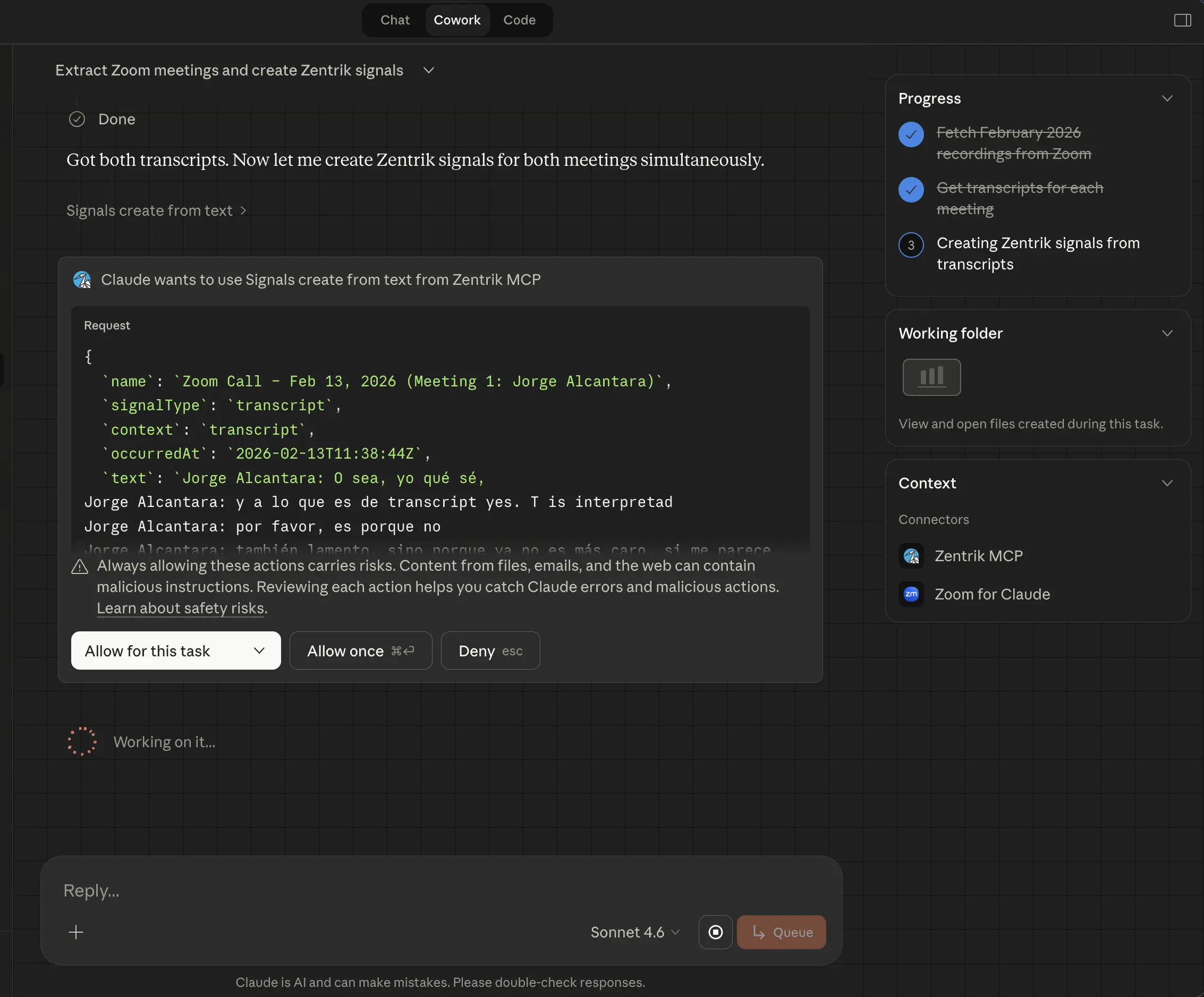
Signal ingestion stays reviewable: the client asks for approval before creating durable evidence in Zentrik.
3. Turn evidence into backlog ideas
Once the relevant evidence has finished processing, use this workflow to consider product work. Creating ideas requires a Zentrik role with write access.
Prompt
Turn the reviewed Zentrik evidence into product backlog ideas.

Use the current product context, processed signals, linked insights and
opportunities, and existing ideas. Search for similar ideas before proposing
anything new.

Return a review table with one row per candidate:
- concise problem statement and proposed idea
- affected users, product area, or account
- supporting signal, insight, and opportunity public IDs
- evidence strength and confidence
- likely duplicate or overlap
- recommended next step

Do not write anything yet. After I approve specific candidates, create only
those ideas, link the supporting records, assign the product, and report each
created idea public ID. Do not invent effort, impact, or priority scores unless
I provide them. Do not create initiatives or implementation tasks unless I ask
for that separately.In Zentrik, an idea is a discovery-backed product backlog item. It is not the same as a generic todo or an implementation task; those belong in an initiative once the product decision has been made.
More workflows
Choose one of these when the starter workflows do not fit the question in front of you.
Show more workflows
Work from the current sprint
Use this to carry a task's customer context into implementation and record what was delivered. Your MCP connection needs the sprint, task and evidence tools; reconnect to approve them if they are missing from an older grant.
Prompt
Find the pending tasks in my team's current sprint. Show priority, owner and
status, then load the selected task's instructions and linked Idea or Evidence.
After implementing and testing the work, attach its PR and move the task to
review. When the work is delivered, update the Idea if its full scope is complete
and mark the specific evidence records it addressed as acted on.
Tool sequence
- Resolve the team with
teams.list; calltasks.listwithteamId,sprintId: "current"andstatus: "pending". - Read
tasks.get. FollowsourceIdeaIdwithideas.getandideas.get_evidence, orsourceEvidenceIdwithsignal_evidence.get. - After code and tests are ready, use
tasks.attach_pull_requestandtasks.set_status. Usetasks.updatefor instructions, owner, sprint, priority, dependencies or the Idea link. - Apply the exact configured Idea status with
ideas.set_status. Resolve selected evidence withsignal_evidence.set_resolutionandresolved: true; usefalseto reopen it.
Pending includes blocked and in-review work; it excludes done tasks. If the team has no active sprint, the result is empty. Page through the full result set before claiming it contains all pending work.
A PR attachment records a URL without verifying it or marking work shipped.
Stored GitHub status is available through tasks.list_pull_requests after sync.
Task completion, Idea status and evidence completion are separate actions: one
task may cover only part of an Idea, and evidence can qualify or contradict it.
Idea evidence reads return direct links, not inferred links through Insights.
To find evidence for one account, resolve its UUID with accounts.list, then
call signal_evidence.list with accountId. Add category: "Product bug"
or evidenceType: "product_feedback" to narrow the results. Type and category
use exact, case-sensitive values; all filters combine before pagination.
Account matches come from the evidence’s source Signal.
Completed-sprint tasks are read-only. Linear-owned fields must be changed in Linear. Team membership controls access, and task writes need team editor access. See the Tasks API and Signal evidence API for scripts using workspace API keys.
Understand customer themes
For a fast read on what customers are saying before planning or prioritizing, start here.
Prompt
What recurring customer or product themes appear in this Zentrik workspace?
Group them by theme, include supporting signals or quotes, and call out where
evidence is weak or missing.
Best for
- weekly PM syncs
- onboarding someone new to the problem space
- getting an evidence-backed snapshot before a decision
Ask for quotes and provenance so the answer stays anchored to real evidence.
Trace evidence behind a decision
For an idea, opportunity, or roadmap bet that needs a defensible evidence trail, start here.
Prompt
Find the ideas or opportunities with the clearest evidence trails. For each one,
summarize the linked signals, insights, accounts, and what decision it supports.
Why this matters
- it keeps product decisions tied to customer evidence
- it shows where links are strong enough to trust
- it highlights where a bet still needs validation
If you already know the record, name it directly: "Trace the evidence behind [idea or opportunity name]."
Compare priorities
Before a roadmap, staffing, or prioritization conversation, run this workflow.
Prompt
Compare open opportunities using available ARR or account impact, evidence
strength, linked insights, linked ideas, and status. Return a table with a
recommended next action and note any missing data.
It combines revenue context with evidence strength and shows which high-impact bets still need validation.
Prepare initiative context
When a team moves from discovery into requirements, planning, or implementation, use this workflow.
Prompt
Get context for [initiative name or ID] and draft a concise PRD brief with
problem, users, evidence, scope, non-goals, risks, and open questions.

If I approve changes to the Initiative or answer its open questions, update
those source fields first. Then regenerate the existing PRD from current
Initiative state with initiative_documents.regenerate. Inspect the returned
job with initiative_documents.get_regeneration until it is completed or failed,
and report the document ID and final status. Do not use update_html for this
workflow; that is a direct overwrite, not a source-grounded rebuild.
It pulls the brief from the same evidence and product context as Discovery, exposes missing questions, and can rebuild the durable PRD after the Initiative changes.
Run a Study learning loop
When a meeting or product decision exposes a learning need, use this workflow before the team hardens scope. The agent can help throughout the loop while Zentrik remains the review and launch surface.
The existing studies.get_evidence tool includes feedback ratings with participant name, email, and account when known. Existing connections authorized to use this tool receive these fields without a new permission or reconnection. Feedback is limited to the selected Study and your team access. Use feedbackLimit (up to 100, default 20) and feedbackOffset to retrieve more ratings; unknown participants remain null.
To see who responded and what they answered, use studies.get_responses (public tool name studies_get_responses). It includes respondents who skipped the rating and returns the same items as the REST response endpoint. Name, email, and organization (accountName) match the saved details shown in the Responses tab; unknown identity stays null. One item represents a response, so repeated submissions remain separate.
Follow pagination.hasMore using limit and offset to retrieve every page. Optional submittedFrom (inclusive) and submittedTo (exclusive) filter by response submission time. This tool requires the mcp:tool:studies.get_responses scope and respects your Study and team access. The existing evidence tool and rating feed keep their current behavior.
1. Check whether the learning need is already covered
Review the existing Studies linked to [Idea or Initiative name or ID].

We need to learn: [specific learning need or decision].

Tell me whether an existing Study already covers this question, its current
status, response coverage, and what remains unresolved. Do not create or update
anything yet.
2. Create or revise a self-guided Study
Create one private self-guided Study draft linked to [Idea or Initiative name or ID].

We need to learn: [specific learning question].
Audience: [who should participate and relevant screening context].
Decision: [what the team will decide with the result].
Success looks like: [the evidence threshold or behavior that would be sufficient].

Use this selected excerpt only to shape the plan:
[paste the relevant excerpt]

If one learning need and one context are clear, create one private Study draft
linked to that Idea or Initiative without asking me to confirm the same action
again. Use a stable idempotency key for retries. If the decision or context is
materially ambiguous, ask one focused question and create nothing yet.

Then read the Study back and report whether it was created or reused, its public
ID, audience, decision, learning question, full activity plan, setup blockers,
and Zentrik link. If I ask for a revision, preserve the returned activity and
option IDs and update the response-free draft using its latest concurrency
timestamp.

After responses arrive, show aggregate evidence and feedback ratings with the
participant name, email, and account when known. Do not include raw research
answers, notes, or transcripts. Generate draft findings only when I explicitly
ask, then report the evidence strength, open questions, and Zentrik review link.

Do not publish the Study, create a participant link, invite anyone, turn the
meeting into findings, or create evidence as a side effect. Do not treat draft
findings as reviewed. If the excerpt
should become durable evidence, propose a separate Signal workflow.To revise the response-free draft later:
Revise [STUDY-ID] so [specific change]. Keep the existing activity and option
IDs for unchanged parts of the plan, use the latest version you just read, and
report the complete updated plan and any remaining launch blockers.
3. Create a Live Interview guide
Create one private Live Interview Study linked to [Idea or Initiative name or ID].

We have [30] minutes with [audience]. We need to understand [learning question]
so we can decide [decision]. Build a conversational guide with an opening,
focused topics, probes, what to listen for, and completion criteria. Keep it to
the available time. Then report the guide, its total duration, setup blockers,
and Zentrik link. Do not start the Study or add completed interviews.
4. Monitor responses and prepare findings for review
For [STUDY-ID], summarize response coverage, completion, and aggregate feedback.
Compare the available coverage with the Study's stated sufficiency criteria.
Show feedback ratings with participant name, email, and account when known.
Do not infer answer quality from counts alone. Do not include raw research
answers, notes, or transcripts, and do not generate findings yet.
When you are ready for synthesis:
Generate draft findings for [STUDY-ID]. Report each claim's evidence strength,
sample count and evidence-reference count, recommended next step, unresolved
questions, and the Zentrik review link. Keep every finding in draft review state.
What stays under teammate control in Zentrik
- publishing or starting the Study
- participant links, invitations, and access rules
- stimulus uploads and visual quality checks
- raw Study responses and completed Live Interviews
- review, editing, acceptance, or rejection of draft findings
- archival or deletion
Maintain ideas and generated documents
For a precise, reviewable update to an existing Idea or Initiative, start here.
Prompt
Review [idea name or ID] and its linked Initiative before changing anything.

First call discovery.describe_taxonomy when taxonomy fields matter. Use the
exact active group and option keys. Use analytics.aggregate_entities with
entity: idea and groupBy: taxonomy when I ask for counts by an Idea taxonomy
field; do not download and count raw Ideas yourself.

For the selected Idea:
- use idea_questions.list to show planning questions and current answers
- wait for my approval before using idea_questions.answer
- use ideas.create or ideas.update classifications only for the taxonomy groups
  I approve; omitted groups must remain unchanged
- use ideas.update projectId to attach it to one Initiative, or projectId: null
  to detach it; if it is linked elsewhere, detach it first instead of moving it
  implicitly
- for a status-only edit, use ideas.set_status with the exact configured status
  label and pass expectedCurrentStatus when confirming a previously read Idea;
  do not use it for the promoted-role status
- if I ask to remove a comment, identify the exact comment and wait for explicit
  confirmation before using ideas.delete_comment

For the selected Initiative:
- use teams.list before proposing a team change; do not guess team IDs
- show the complete current and proposed team sets
- wait for my approval before using initiatives.set_teams
- keep at least one team assigned, and report when my workspace role cannot make
  the change

When approved Initiative or question changes make an Initiative Brief, PRD, or
TDD stale, use initiative_documents.regenerate with INITIATIVE_BRIEF, PRD, or
TDD. Poll initiative_documents.get_regeneration until it completes or fails.
Do not substitute initiative_documents.update_html; that directly overwrites
stored HTML instead of rebuilding from current Initiative state.

Return the public IDs, changed taxonomy groups or relationship, and final job
receipt. Do not imply that a write succeeded unless you read back its result.Important behavior
- Idea taxonomy writes are patch-style: only supplied groups change.
- An Idea belongs to at most one Initiative; moving it is a detach-then-attach workflow.
- Comment deletion affects only the addressed comment and is destructive.
- Initiative team changes replace the complete assignment set; omitted teams are removed.
- Concurrent document regeneration requests reuse the active job receipt.
Review what a person or agent changed
When a teammate reports that a person or agent updated Zentrik, use this workflow for a receipt-backed answer.
MCP and Slack-agent product mutations are fully tracked after receipt collection begins. Workspace-agent history is partial while legacy direct tools remain. UI, External API, integration, background-job, and portal mutations are not yet tracked.
You can use this prompt in an MCP client, the Zentrik workspace assistant, or with @Zentrik in Slack.
Prompt
What did [person name] change in Zentrik through [Claude, Claude Code, ChatGPT,
the Zentrik workspace assistant, or @Zentrik in Slack] in the last [24 hours / 7 days]? Show confirmed product
changes separately from retries, failures, unfinished work, or results that
could not be verified. Summarize duplicates, state whether the requested time
and channel are fully covered, name any coverage gaps, and do not change anything during this review.
What to do next
Treat the output as a working draft.
Good follow-up moves:
- turn a synthesis into a team update, planning note, or next question
- review a newly created signal in Zentrik after processing finishes
- use ranked opportunities as an input to roadmap or initiative discussion
- use the precise Idea question, classification, Initiative link, comment, and generated-document tools for supported maintenance; use Zentrik for broader graph cleanup
If you want a better answer, narrow the scope instead of adding more instructions. See MCP best practices.
Troubleshooting
Check these steps against what you see in your workspace. If something differs, note your workspace name and the screen, then contact us.
The answer is too generic
Ask for provenance, quotes, or a specific output format. Narrowing the scope by timeframe, topic, or product area usually improves quality more than adding more narrative instructions.
A newly created signal is not ready yet
Signal processing is asynchronous. Wait a short time, then ask the agent to fetch the signal again or review it in Zentrik once extraction has finished.
A write prompt is blocked
Read-only prompts work with Viewer-style roles. Creating, updating, deleting, ingesting, processing, tagging, or generating records requires a Zentrik role with write access, and Claude may ask for approval before write or destructive tools run.
The Study tools do not appear
Reconnect the MCP client and approve the current Zentrik permissions. Some clients keep the tool scopes from the original connection until you reconnect or re-consent.
The workflow needs a different workspace
Reconnect the MCP client and choose the workspace you want. Zentrik MCP tokens are scoped to one workspace at a time.
Continue from here
Related guides
Did this guide answer your question?
Your response helps us prioritize missing or unclear documentation.
Still stuck?
Send your question to Zentrik support. This guide will be included automatically.